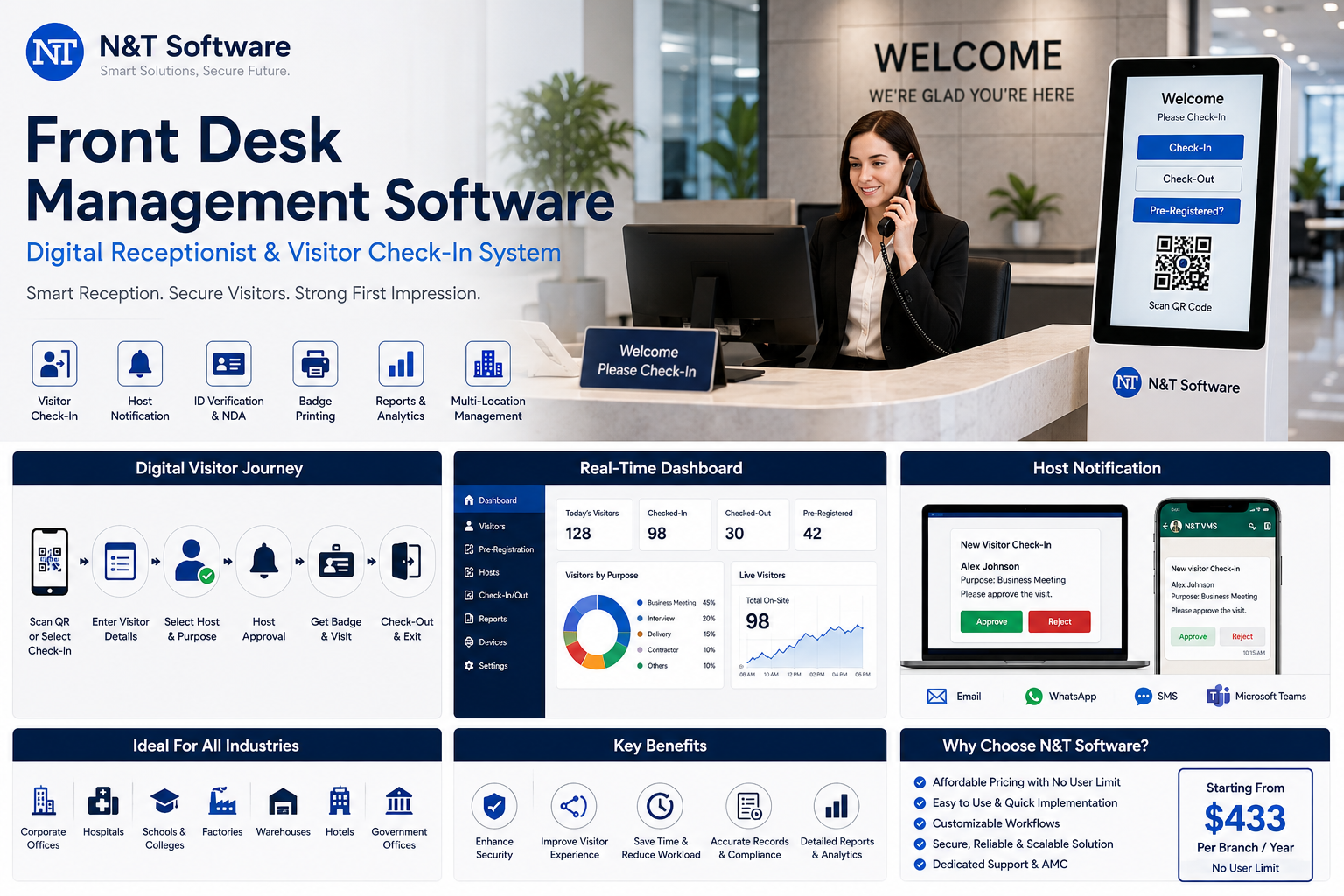
A complete 2026 guide to front desk management software, digital receptionist systems, visitor check-in, QR registration, host notifications, badge printing, pricing, implementation and vendor selection.
A front desk is the first point of contact between an organization and its visitors. Paper registers, handwritten passes, manual phone calls and unstructured reception processes can create queues, incomplete records, privacy concerns and security gaps.
Front desk management software digitizes visitor registration, host notifications, approvals, badge printing, digital passes, check-in, checkout, visitor tracking and reception reporting from one central system.
This guide targets high-demand searches including front desk management software, digital receptionist software, reception management software, visitor check-in system, virtual receptionist software, front office management software, self-service reception kiosk and office visitor management system.
Quick Answer: What Is Front Desk Management Software?
Front desk management software is a digital system used by reception, security and facility teams to manage visitors from invitation and pre-registration through arrival, approval, badge issue, onsite tracking and checkout.
A visitor can scan a QR code or use a kiosk, enter required details, select the host, complete an NDA or safety declaration, wait for approval and receive a printed or digital visitor pass. The organization receives a searchable, time-stamped record of the complete visit.
N&T Software Front Desk and Visitor Management System
N&T Software can be evaluated first by organizations looking for configurable and affordable digital reception software. Review the N&T Visitor Management Software platform and request a demonstration using your actual office and reception workflows.
N&T can support visitor pre-registration, QR and manual check-in, OTP verification, host approvals, visitor photographs, digital gate passes, badge printing, email or WhatsApp notifications, multi-branch control, department-based workflows, safety questionnaires, check-in and checkout, searchable visitor history, reports and integration planning.
Exact devices, access-control integrations, notification channels, custom fields and workflow changes should be confirmed through a tailored demonstration and written scope.
N&T Front Desk Software Pricing
The daily equivalent explains affordability only. Software plans are billed annually. Both plans are positioned with no user limit, which can benefit businesses that do not want separate charges for each receptionist, employee or administrator.
Review the latest commercial structure on the N&T pricing page and request a written quotation for your branches, devices, integrations and support needs.
Why Businesses Are Replacing Paper Reception Registers
Slow visitor registration
Visitors repeatedly write their name, phone number, company and host details. Handwriting may be incomplete or difficult to read, while busy arrival periods create queues at reception.
Manual host notification
Receptionists must call employees individually. When the host is unavailable, visitors may wait without a clear approval or escalation process.
Limited privacy and security
A paper register can expose the names, phone numbers and organizations of previous visitors. It also provides no automated watchlist, approval, expiry or badge-revocation control.
No reliable live onsite list
During an evacuation, teams may not know which visitors remain inside, where they were going or which employee is responsible for them.
Difficult reporting
Finding a visitor from several weeks earlier may require checking multiple pages. Digital records make visitor history searchable by name, company, host, date, branch, purpose and status.
Front Desk Management Software Features
Visitor pre-registration
Employees or authorized teams can register expected visitors before arrival. Invitations may include the meeting time, office location, host details, QR code, parking instructions, directions, safety information and privacy notice.
QR code visitor check-in
Visitors scan a QR code using their own phone and complete registration without installing an application. Read the QR Code Visitor Management Guide for detailed gate-pass and contactless check-in requirements.
Self-service reception kiosk
A tablet or kiosk can guide visitors through registration when reception is busy or unstaffed. Compare hardware, placement, accessibility and fallback controls in the Self-Service Visitor Check-In Kiosk Guide.
Digital receptionist and virtual front desk
A digital receptionist automates repetitive tasks such as greeting visitors, asking questions, identifying the host and providing instructions. A virtual receptionist may also connect the visitor to a remote employee using video, voice, chat or workplace communication tools.
Host approval and notifications
The system can notify the host through email, SMS, WhatsApp, a mobile application or a reception dashboard. The host may approve, reject, reschedule or request that reception hold the visitor.
Visitor badge printing and digital passes
Temporary badges can display the visitor name, photograph, company, host, destination, validity and QR code. Learn more in the Visitor Badge Printing Guide.
NDA, privacy notice and document signing
Visitors can review and acknowledge non-disclosure agreements, privacy information, photography restrictions, safety instructions, health declarations and terms of entry before access is issued.
Visitor watchlists and blocklists
Authorized security users can create restricted-visitor rules and discreet alert workflows. The Visitor Screening and Watchlist Guide explains matching, false-positive review, badge holds and real-time alerts.
Emergency visitor headcount
Reception and emergency teams need a live list of visitors, contractors, delivery drivers and event attendees onsite. Use the Visitor Evacuation and Digital Muster Guide when defining roll-call and missing-person workflows.
Multi-location front desk control
A central administrator can oversee visitor activity across multiple branches while allowing local reception and security teams to manage their own office, entrance, departments and approval rules.
Front Desk Management Software vs Digital Receptionist
Businesses may combine both. The visitor management platform controls registration, approval, security and records, while a remote receptionist assists visitors through video or voice.
Front Desk Software for Different Industries
Corporate offices
Manage clients, candidates, interviewees, consultants, vendors and business partners with branded invitations and host approvals.
Hospitals and clinics
Register patient visitors, attendants, suppliers, service engineers and medical representatives while applying department, visiting-time and safeguarding rules.
Schools and colleges
Manage parents, guardians, vendors, contractors, event guests and external instructors through approved entry and auditable records.
Factories and warehouses
Combine visitor registration with PPE confirmation, safety induction, gate approval, contractor access, delivery references and vehicle entry.
Hotels and serviced offices
Manage business visitors, vendors, candidates, contractors and service personnel. Hotel property-management software is different from general visitor management, so procurement requirements should be separated carefully.
Government and commercial buildings
Use structured approvals, identity verification, visitor passes, restricted zones, multi-tenant workflows and auditable entry records.
How to Select Front Desk Management Software
Ask every shortlisted vendor to demonstrate the same real scenarios rather than presenting a generic product tour.
- Pre-register a visitor and send a branded invitation.
- Process QR, kiosk and reception-assisted check-in.
- Handle a walk-in when the host is unavailable.
- Print, revoke and reprint a visitor badge.
- Trigger a restricted-visitor alert without exposing sensitive details.
- Run an emergency headcount and identify an unaccounted visitor.
- Search and export visitor history.
- Demonstrate multiple branches and local permissions.
- Show behaviour during internet, kiosk, printer or integration failure.
- Apply data retention, export, anonymization and deletion rules.
Front Desk Software Cost Factors
The lowest headline subscription may not provide the lowest total cost. Buyers should calculate software licences, branches, kiosks, tablets, badge printers, consumables, SMS or WhatsApp charges, installation, migration, access-control integration, customization, training, support, renewal, per-user charges and visitor-volume limits.
Use the Visitor Management System Cost and Pricing Guide to prepare a complete three-year or five-year comparison.
Front Desk Software Implementation Checklist
Identify reception desks and entrances; define visitor categories; decide which data is necessary; document approval and escalation rules; confirm badge requirements; configure privacy and retention; prepare the host directory; test notifications and integrations; train reception and security; test emergency headcount; pilot one location; and review waiting time after launch.
Follow the Visitor Management System Implementation Checklist for a structured rollout plan.
High-Demand Keywords Covered
Primary and supporting search phrases include front desk management software, digital receptionist software, reception management software, visitor check-in system, front desk software, front office management software, visitor sign-in software, office visitor management system, automated receptionist software, virtual front desk system, self-service reception kiosk, QR visitor check-in, host notification software, visitor badge printing, digital visitor logbook, paperless reception system and multi-location reception management.
Frequently Asked Questions
What is front desk management software?
It is software that digitizes visitor registration, host notifications, reception workflows, badges, check-in, checkout and visitor reporting.
What is a digital receptionist?
A digital receptionist is a kiosk, tablet or virtual interface that greets visitors, collects information and connects them with the correct employee or a remote receptionist.
Can front desk software replace a receptionist?
It can automate repetitive registration work, especially at small or unstaffed entrances. Human support may still be needed for complex questions, accessibility, customer service and security judgment.
Can visitors check in using their own phones?
Yes. QR-based systems allow visitors to scan a code and complete registration from a mobile browser.
Can it manage multiple offices?
Yes. A multi-location visitor management system can provide centralized reporting with separate reception, approval and security workflows for each branch.
How much does front desk management software cost?
Pricing varies by branch, kiosk, user, visitor volume, notification channels, hardware and integrations. N&T’s current structure starts at USD 433 per branch per year for the Standard Plan.
Can N&T Software customize the reception workflow?
N&T Software can be evaluated for configurable and custom workflows. Exact changes, delivery time and customization costs should be documented during scope finalization.
Related Resources
- Visitor Sign-In System Guide
- Visitor Pre-Registration System Guide
- Affordable Visitor Management System Guide
- Visitor Data Privacy and Retention Guide
- Visitor Management System RFP Template
Final Recommendation
A strong front desk management system should not merely replace a paper register with a tablet. It should improve the complete visitor journey while giving reception, security and management teams better control, faster communication, reliable records and emergency visibility.
For offices seeking an affordable starting point, N&T Software offers annual branch pricing, no user limit, QR and manual registration, approval workflows, notifications, reporting and multi-location management. Compare all shortlisted vendors using identical scenarios and calculate the complete multi-year cost before purchasing.
Contact N&T Software to request a front desk software demonstration and quotation based on your offices, branches, visitor volumes and integrations.