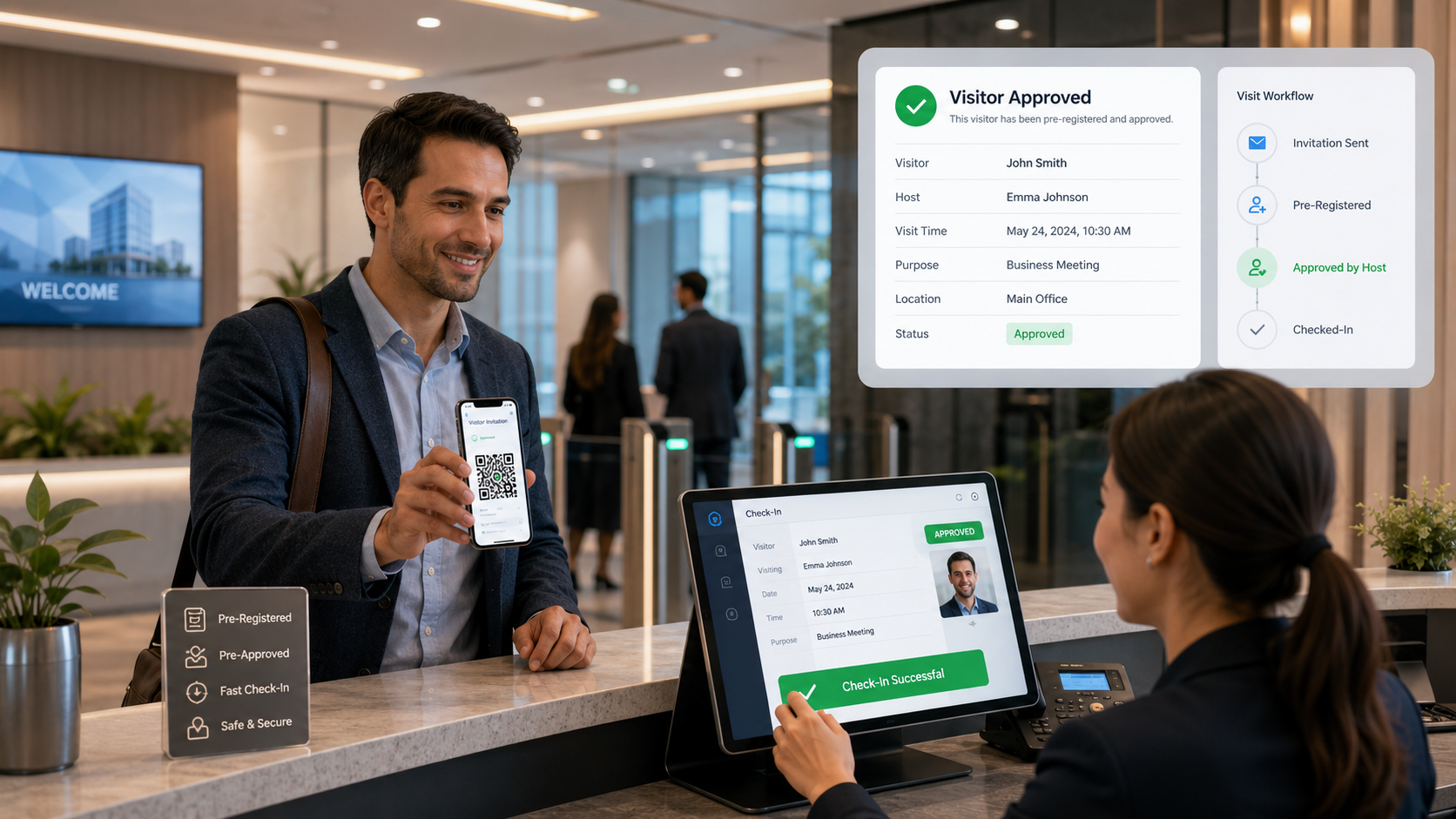
A complete 2026 guide to visitor pre-registration systems and visitor invitation software, covering expected guest registration, host approvals, QR passes, OTP verification, calendar integration, reminders, faster check-in, access control, privacy, implementation and pricing.
Visitors often lose time at reception because their details, purpose, host and approval are collected only after they arrive. A visitor pre-registration system moves this work before the visit, allowing the host or administrator to invite the guest, collect the required information and approve the visit in advance.
The visitor can receive an email, SMS or WhatsApp invitation with visit details, instructions and a secure QR pass. When the guest reaches the building, reception or security verifies the invitation and completes check-in without repeating the full registration process.
Quick answer: Visitor pre-registration software helps organizations invite expected guests, collect details before arrival, route approvals, send QR or OTP credentials, notify hosts and maintain a complete audit trail from invitation to checkout.
What Is a Visitor Pre-Registration System?
A visitor pre-registration system is a digital workflow for creating and approving expected visits before the guest reaches the premises. It is also described as visitor invitation software, guest pre-registration software, a visitor appointment management system or a pre-invite visitor management solution.
The system connects the host, visitor, reception and security team. Instead of relying on phone calls, spreadsheets or handwritten lists, every invitation is created in one system with a date, time, location, host, purpose, status and check-in credential.
Why Pre-Registration Matters
Pre-registration improves both security and visitor experience. Security teams know who is expected, hosts can approve or reject requests before arrival, and visitors spend less time filling forms at the gate or front desk.
- Reduces queues during busy reception and gate-entry periods.
- Confirms the correct host, department, branch and visit purpose in advance.
- Allows security or management approval before a visitor travels to the location.
- Provides clear arrival instructions, parking details, documents and safety requirements.
- Creates an auditable record of who invited, approved, edited or cancelled the visit.
Complete Visitor Pre-Registration Workflow
1. Host creates the invitation
An employee, receptionist, manager or authorized department user enters the visitor name, contact details, company, visit purpose, expected date and time, location and host. The form can change according to visitor type, such as customer, candidate, vendor, contractor, auditor or VIP guest.
2. Approval rules are applied
Routine office guests may need only host approval, while contractors, after-hours visitors or restricted-area visitors may require approval from security, facilities, department heads or multiple approvers. The system should document each decision and escalation.
3. Visitor completes required details
The guest receives a secure link to confirm the invitation and provide any required information. Depending on the organization, this may include identity details, vehicle number, accompanying guests, safety acknowledgement, NDA acceptance or accessibility requirements.
4. QR pass or OTP is issued
After approval, the system sends a unique QR code, visitor pass or OTP. The credential should be time-limited, linked to the approved visit and invalid after cancellation, checkout or expiry.
5. Arrival and fast check-in
At reception, gate or kiosk, the visitor scans the QR code or provides the invitation details. Staff verify the approved record, complete any final checks, issue a badge if needed and check the visitor in. The host receives an arrival notification.
6. Checkout and record closure
Checkout records the departure time, closes the active visit and can revoke connected access permissions. Overdue or incomplete visits should appear in a live exception list for reception and security teams.
For the arrival process, review the QR Code Visitor Management System Guide covering secure QR passes, scanning and contactless check-in.
Essential Features to Compare
- Host-created and administrator-created invitations.
- Single, recurring, group and bulk visitor invitations.
- Configurable forms based on visitor type, location and visit purpose.
- Single-level or multi-level approval with backup approvers and escalation.
- Email, SMS or messaging invitations, reminders, changes and cancellation alerts.
- Unique QR codes, OTP verification and expiring digital passes.
- Calendar integration for creating invitations from approved meetings.
- Badge printing, host notifications, parking instructions and access-control integration.
- Multi-location administration, visitor history, dashboards and exportable reports.
Visitor Pre-Registration vs Walk-In Registration
Pre-registration is designed for expected guests. Their visit details and approval are prepared before arrival. Walk-in registration is used when a visitor arrives without an invitation and reception must create the record, contact the host and request approval at that time.
A practical system should support both. Organizations should encourage pre-registration for planned meetings while retaining a controlled walk-in process for unexpected visitors, deliveries, urgent maintenance and other valid exceptions.
Industry Use Cases
Corporate offices and coworking spaces
Employees can invite clients, candidates and business partners from their desktop or mobile device. Multi-tenant buildings can route each invitation to the correct company, host, floor and reception desk.
Factories, warehouses and construction sites
Contractors and vendors can submit required details before arrival, complete safety acknowledgements and receive approval for a specific gate, work area and time window. This reduces manual gate processing while maintaining stronger controls.
Hospitals, schools and government facilities
Departments can schedule approved visitors, parents, vendors, inspectors and official guests while applying location-specific identity, privacy and access requirements.
Events, training and group visits
Organizers can upload or invite groups, issue individual QR passes and track arrivals without maintaining separate spreadsheets. Each guest should still have a unique record to prevent credential sharing and preserve accurate attendance.
Security and Privacy Controls
Pre-registration should collect only information that is necessary for the visit. Organizations should define who can view visitor details, how long records are retained, when identity documents or photos are deleted and which actions are captured in the audit history.
- Role-based access for hosts, reception, security, managers and auditors.
- Time-limited invitation links and QR credentials that cannot be reused after expiry.
- Controlled handling of blocked, denied, cancelled or watchlisted visitors.
- Audit records for invitations, approvals, edits, exports, badge reprints and manual overrides.
Use the Visitor Data Privacy and Retention Guide when defining collection, access, retention and deletion rules.
Useful Integrations
Visitor invitation software becomes more useful when it connects with systems employees already use. Calendar integration can convert an approved meeting into a visitor invitation. Employee directories can keep host details current, while access-control integration can issue temporary credentials only after approval and check-in.
- Microsoft 365, Google Calendar or meeting scheduling tools.
- HRMS, Active Directory or employee directory systems.
- Access control, turnstiles, smart locks, lifts and parking systems.
- Email, SMS, WhatsApp or other approved notification services.
Read the Visitor Management System Integration Guide for access control, directories, CCTV and API planning.
Implementation Checklist
- List visitor types, locations, gates, hosts, approval owners and restricted areas.
- Decide which information is required before arrival and which checks happen at reception.
- Configure invitation templates, reminders, cancellation rules, approval levels and credential validity.
- Test normal visitors, group invitations, rejected requests, late arrivals, expired QR codes and walk-in exceptions.
- Train hosts, reception and security teams, then review adoption and exception reports after launch.
Follow the complete Visitor Management Implementation Checklist for configuration, testing, training and rollout.
Common Mistakes to Avoid
- Making the pre-registration form so long that visitors avoid completing it.
- Sending a QR code before the required approvals are complete.
- Allowing hosts to invite visitors to restricted areas without additional authorization.
- Failing to cancel or expire credentials when a meeting changes.
- Ignoring walk-in and offline procedures because the main workflow is digital.
Why Consider N&T Software
N&T Software Private Limited’s Visitor Management System can support visitor invitations, pre-registration, host or department approval, QR-based entry, OTP verification, pass printing, notifications, checkout tracking, multi-location administration and configurable reports.
The workflow can be reviewed for offices, hospitals, schools, factories, warehouses, commercial buildings, government facilities and other controlled environments. The demonstration should use your actual visitor types, approval hierarchy, entry gates and security policies.
Frequently Asked Questions
Can a host pre-register a visitor from a mobile device?
Yes. A mobile-friendly system can allow authorized employees to create invitations, select the location and host, submit approval and check the visit status without using the reception desk.
Can the visitor receive a QR code before arrival?
Yes. The QR code can be sent after the visit is approved. It should be unique, time-limited and linked to the specific visitor, location and visit schedule.
Does pre-registration replace reception or security verification?
No. It prepares and approves the visit before arrival, but the organization can still require identity checks, photo capture, badge issue, safety confirmation or other controls at check-in.
Can the system handle recurring and group visitors?
Yes. It can support recurring schedules and group invitations, provided every visitor receives an individual identity and visit record for accurate security, reporting and checkout.
How much does visitor pre-registration software cost?
Cost may depend on locations, users, visitor volume, notification usage, badge printing, integrations, customization, hosting and support. Compare the total implementation and recurring cost rather than only the starting subscription.
Related Resources
- Visitor Sign-In System Guide — Digital registration, check-in and badge printing.
- QR Code Visitor Management System — Contactless check-in and secure QR gate passes.
- Visitor Management System Cost Guide — Software, setup, hardware, integrations and support costs.
Final Recommendation
A strong visitor pre-registration system should make expected visits faster without weakening entry controls. It should give hosts an easy invitation process, visitors clear instructions, security reliable approvals and management a complete record of every important action.
Before selecting a platform, test the full journey: create an invitation, change the meeting time, reject an approval, scan an expired QR code, process a group arrival, check out the visitor and verify the audit report. This reveals whether the workflow is practical in real operations.
Contact N&T Software to discuss visitor pre-registration, invitation, approval and QR check-in requirements for your organization.