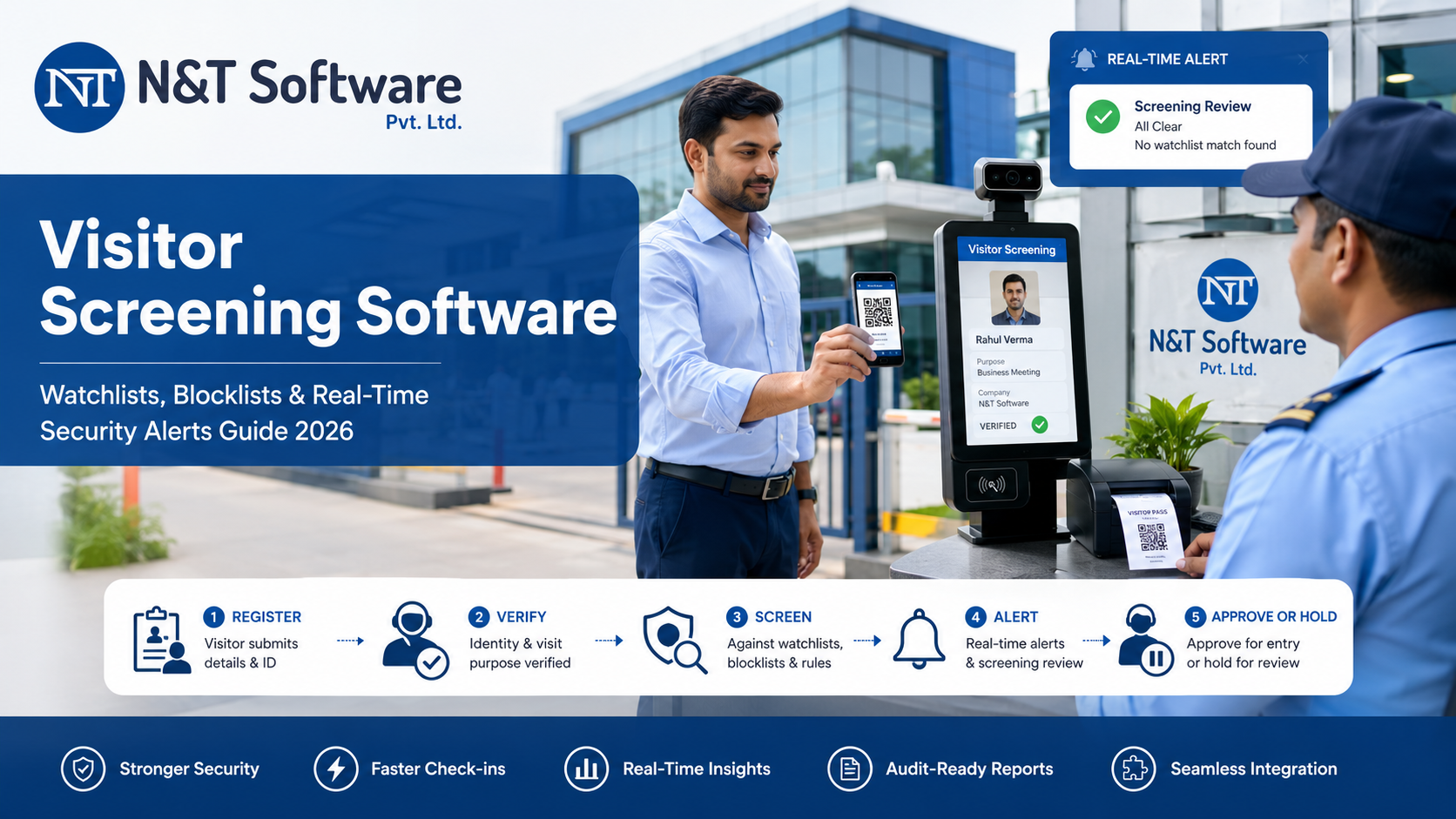
A complete 2026 guide to visitor screening software, watchlists, blocklists, identity matching, real-time security alerts, false-positive control, privacy, implementation, pricing and vendor selection.
A visitor management system should do more than record names at reception. In higher-risk workplaces, it must identify restricted visitors, warn security before a badge is issued, preserve an auditable decision trail and prevent a possible match from becoming an uncontrolled entry.
Visitor screening software combines digital registration, visitor watchlists, blocklists, identity verification, configurable matching rules and real-time security alerts. It can support offices, factories, hospitals, schools, warehouses, data centres, government facilities, commercial buildings and other sites that need stronger control over who may enter.
This 2026 guide explains how visitor watchlist screening works, the difference between a watchlist and a blocklist, how to reduce false positives, which alerts security teams need, how leading platforms approach screening and how to implement the process without creating unfair or unlawful decisions.
Quick Answer: What Is Visitor Screening Software?
Visitor screening software is a security layer within a visitor management system that checks an expected or arriving visitor against approved internal or external risk lists. When it detects a possible match, it can pause check-in, suppress badge printing, notify security, request additional identity verification and record the final allow-or-deny decision.
The strongest visitor screening workflow does not rely on a name alone. It combines relevant identifiers, clear match thresholds, trained human review, restricted access to sensitive records, documented escalation instructions and a complete audit log.
N&T Software can be evaluated first by organizations that want visitor registration, configurable approvals, QR or OTP entry, visitor history, access-control workflows and security-alert requirements in one implementation discussion. Exact watchlist, blocklist, identity-matching and alert behaviour should be confirmed during the demonstration and written scope.
Visitor Watchlist, Blocklist and Blacklist: What Is the Difference?
Visitor watchlist software
A visitor watchlist identifies people or attributes requiring additional attention. A possible match may trigger verification or security review, but it does not always mean automatic denial. Reception may be instructed to call security, verify an identity document or contact the sponsoring department before continuing.
Visitor blocklist or denied visitor list
A visitor blocklist is normally used when entry should be stopped unless an authorized security administrator approves an exception. The system may hold the check-in, prevent badge printing, withhold the host-arrival notification and show the visitor a neutral waiting message.
Visitor blacklist software
“Visitor blacklist software” remains a commonly searched phrase, but many organizations now prefer blocklist, denylist or restricted visitor list. The underlying requirement is the same: identify a restricted person consistently and route the case to an authorized decision-maker.
External watchlist screening
Some regulated or high-risk organizations may screen against government sanctions lists or approved third-party databases. The U.S. Office of Foreign Assets Control provides current list data through its official Sanctions List Service. External screening is not necessary or legally appropriate for every visitor program and requires a valid purpose, lawful basis, reliable source and documented review process.
Why Visitor Screening Software Is in High Demand in 2026
Organizations are replacing separate spreadsheets, paper incident books and verbal warnings with centralized visitor risk controls. Security teams need the same restriction to apply across entrances and branches, while reception teams need a discreet process that does not expose sensitive information or create confrontation at the desk.
- Automatic screening during visitor invitation, pre-registration, kiosk check-in and walk-in registration.
- One controlled visitor watchlist across multiple gates, branches, buildings or tenants.
- Silent real-time alerts on security dashboards, email, mobile devices or guard applications.
- Badge, QR pass and temporary access-card holds until a possible match is reviewed.
- Audit-ready records of the match, reviewer, evidence, final decision and override.
- Different screening policies for visitors, vendors, contractors, drivers and temporary workers.
How Visitor Watchlist Screening Works
- Capture only the visitor identifiers required by the approved security policy.
- Normalize the name and approved identifiers such as email, phone, company, ID reference or vehicle registration.
- Compare the visitor against internal watchlists, blocklists and any approved external source.
- Apply exact, alias, phonetic or fuzzy matching according to the organization’s threshold.
- Place a possible match into a review state before badge printing or access activation.
- Send a silent alert to designated security contacts with the minimum information required to investigate.
- Record the authorized reviewer’s allow, deny, escort, escalate or false-positive decision.
- Write the complete event to an audit trail and synchronize the result with connected entry systems.
Matching Methods Used by Visitor Screening Systems
Exact matching works well for reliable identifiers such as an exact email address, phone number or document reference, but may miss spelling variations and aliases. Fuzzy and phonetic matching can identify similar or sound-alike names, but they can also create false positives for common names.
A screening record may contain known aliases, prior names, initials, transliterations, photos and action instructions. Matching should expose why the alert occurred instead of presenting security staff with an unexplained score.
Photo review can help trained staff confirm identity. Automated facial identification creates additional accuracy, bias, biometric and legal risks. Current NIST identity-proofing guidance requires manual review before an automated biometric search result is used to decline enrollment, a useful safeguard for visitor screening as well.
How to Reduce False Positives and Wrongful Denials
A possible match is not automatically a confirmed identity. A visitor screening system should support an informed security decision and should not turn an uncertain name similarity into an irreversible denial without review.
- Use more than one identifier when policy and law permit.
- Show the reviewer the matching fields, aliases and confidence explanation.
- Use separate thresholds for alerting and automatic blocking.
- Require manual confirmation for fuzzy, phonetic, AI-assisted or biometric matches.
- Allow authorized staff to clear a false positive and record the reason.
- Review watchlist entries regularly and remove expired, duplicated or unsupported restrictions.
Real-Time Visitor Security Alerts: What Should Happen After a Match?
The alert workflow is as important as the matching engine. A public warning on a kiosk can expose confidential information or create an unsafe confrontation. Strong systems use a neutral visitor-facing waiting message while sending detailed instructions only to authorized staff.
- Pause check-in and prevent badge, QR or access-card activation.
- Send a silent security alert with the visitor, location, matched record and action instructions.
- Escalate unanswered alerts to another authorized contact after a defined period.
- Notify the host only according to policy; some cases should remain security-only.
- Create a time-stamped incident record with the reviewer and final decision.
- Synchronize the decision with access control, turnstiles or gate barriers when integrated.
Visitor Screening Software Features to Compare
- Internal visitor watchlist, blocklist and restricted visitor list management.
- Exact, fuzzy, phonetic and alias matching with visible match reasons.
- Screening during both invitation and physical check-in.
- Silent alerts through dashboard, email, SMS, push notification or guard application.
- Allow, deny, escort, escalate and temporary-exception decisions.
- Organization-wide, location-specific, tenant-specific and visitor-type-specific lists.
- Review dates, expiry dates and automatic archival of old entries.
- Audit logs for list creation, matching, review, override, export and deletion.
- Integration with access control, CCTV, turnstiles, directories and incident systems.
Best Visitor Screening Software to Evaluate in 2026
The following overview is based on current public official product information. It is not a universal ranking. Buyers should test each platform with their own policy, naming conventions, visitor volumes, locations and access-control environment.
1. N&T Software Visitor Management System
N&T Software can be evaluated for configurable visitor registration, approvals, QR or OTP entry, visitor tracking, security workflows, multi-location administration and integration planning. Review the N&T Visitor Management Software and request a demonstration of the exact watchlist fields, matching rules, block actions, alerts, reports and integrations required.
N&T is placed first because this article is published on the N&T website. Buyers should validate every requirement through a live demonstration, privacy review, pilot and written project scope.
2. Envoy Visitors
Envoy documents a company-wide visitor blocklist that checks people when they are invited or sign in. A match notifies administrators, who can approve or deny the visit. Its current blocklist documentation notes exact matching behaviour, making testing of punctuation, word order and identifiers important.
3. Visitt
Visitt’s current visitor watchlist documentation describes names, variants, photos, action instructions and AI-assisted possible-match alerts. It states that a possible match supports a security decision and does not automatically prevent check-in.
4. Lobbytrack
Lobbytrack describes internal watchlists, optional online watchlist checks, blocked sign-in and instant alerts to guards and administrators. Review its official watchlist screening overview for current feature details.
5. VisitorOS by FacilityOS
VisitorOS describes custom internal and third-party watchlists, screening during pre-registration or kiosk check-in, real-time alerts and automatic denial options on its watchlist management page. Buyers should confirm external data sources, match thresholds, review controls and licensing.
6. Sign In App
Sign In App currently presents visitor screening, risk insights, ID scanning, identity matching, watchlist screening, live presence tracking and configurable alerts for security teams. Review the current security-team capabilities and verify which features, integrations and plans apply.
Industry Use Cases for Visitor Screening Software
Corporate offices and commercial buildings may screen restricted visitors, former employees, disputed vendors and tenant-specific alerts. Factories and warehouses may combine contractor or driver screening with safety induction, vehicle entry, gate passes and emergency roll call.
Hospitals require carefully governed security, safeguarding and court-related controls without exposing patient information. Schools and universities may use screening for safeguarding, custody restrictions, banned visitors, event entry and contractors, subject to legal review.
Data centres, government facilities and regulated organizations may combine pre-approval, identity verification, escort requirements, access-zone restrictions, watchlist screening and complete audit trails. Residential communities and hotels may use internal restrictions for trespass notices, repeated incidents, resident alerts and vendor controls.
Privacy, Fairness and Data-Protection Requirements
Watchlists contain sensitive personal information and can materially affect access. The organization must define who may create an entry, the evidence required, how long it remains active, who may review alerts, how corrections are handled and how data is protected.
- Collect only information necessary for the screening purpose and restrict it to authorized roles.
- Set review and expiry dates instead of retaining restrictions indefinitely.
- Separate confirmed blocks from unverified intelligence or temporary alerts.
- Require human review for uncertain matches and automated biometric results.
- Create a process to correct inaccurate records and remove obsolete restrictions.
The European Data Protection Board explains purpose limitation, data minimisation, accuracy, storage limitation and security as core principles that should shape any visitor screening program.
Visitor Screening Implementation Checklist
- Define the business and security purpose for every watchlist and blocklist.
- Identify visitor types and locations that require screening.
- Agree the evidence, approval authority, action instructions, review date and expiry date for each entry.
- Select the minimum identifiers needed to produce reliable matches.
- Test exact, fuzzy, phonetic and alias thresholds for false positives.
- Configure badge holds, access holds, silent alerts and escalation contacts.
- Train reception and guards not to reveal sensitive watchlist details.
- Run a controlled pilot and measure alerts, confirmed matches, false positives and response times.
Visitor Screening Software Pricing Factors
Pricing normally depends on locations, entrances, kiosks, visitor volumes, internal versus third-party watchlists, identity or biometric verification, alert channels, access-control integrations, mobile guard applications, audit requirements, customization, onboarding, training and support.
Ask vendors to separate the base licence from watchlist modules, external screening data, per-check charges, messaging, ID-scanner hardware, integrations and annual support. Use the N&T visitor management pricing page as a starting point and request a written quotation for the exact screening scope.
Questions to Ask a Visitor Screening Software Vendor
- Can the system screen both invited visitors and walk-ins?
- Which fields support exact, fuzzy, phonetic and alias matching?
- Can reviewers see why a match occurred and clear a false positive?
- Does a possible match stop badge printing and access activation?
- Can restrictions be global, location-specific, tenant-specific or visitor-type-specific?
- How are sensitive records protected, reviewed, exported, corrected and deleted?
- Which costs apply to external data, screening checks, messaging, hardware and integrations?
Frequently Asked Questions
What is visitor screening software?
It checks expected or arriving visitors against internal or approved external risk lists and routes possible matches to security before access is granted.
What is visitor watchlist software?
It stores people or identifiers requiring additional review. A match may generate an alert, request verification or trigger an escort rule without automatically denying entry.
What is visitor blocklist software?
It identifies visitors who should not complete check-in unless an authorized person approves an exception. It can hold badge printing, QR activation and access credentials.
Can visitor screening happen before arrival?
Yes. Screening during invitation or pre-registration gives security time to review a possible match before the person reaches the entrance.
Can a watchlist match automatically deny entry?
Some systems support automatic denial, but uncertain fuzzy, phonetic, AI or biometric matches should normally receive trained human review.
Does visitor screening replace a background check?
No. A visitor watchlist check is not automatically a criminal, employment or regulatory background check. Those services have separate legal, source, consent and due-process requirements.
How long should visitor blocklist data be retained?
There is no universal period. Each entry should have a justified retention period, review date and expiry or deletion process based on policy, law and the underlying risk.
Can N&T Software provide visitor screening and security alerts?
N&T Software can be evaluated for configurable visitor, approval, tracking, access and security workflows. Required watchlists, matching rules, block actions, alert channels, integrations and reports should be confirmed through a tailored demonstration and written scope.
Related Resources
- Visitor Security and Compliance Guide
- Gate Security Management System Guide
- Visitor Management Integration Guide
- Face Recognition Visitor Management Guide
- Visitor Data Privacy and Retention Guide
- Visitor Evacuation and Digital Muster Guide
Final Recommendation
Visitor screening software should identify risk without turning every visitor into a suspect. The best system applies a documented policy consistently, alerts security discreetly, prevents credentials from being issued before review, reduces false positives and creates an auditable record of the final decision.
Start with a well-governed internal watchlist, clear entry and expiry rules, multiple identifiers and trained human review. Add third-party data, fuzzy matching, biometrics and automatic denial only when the risk, law and operational process justify them.
Contact N&T Software to discuss visitor watchlists, blocklists, real-time security alerts, access-control integration and a tailored visitor screening demonstration.