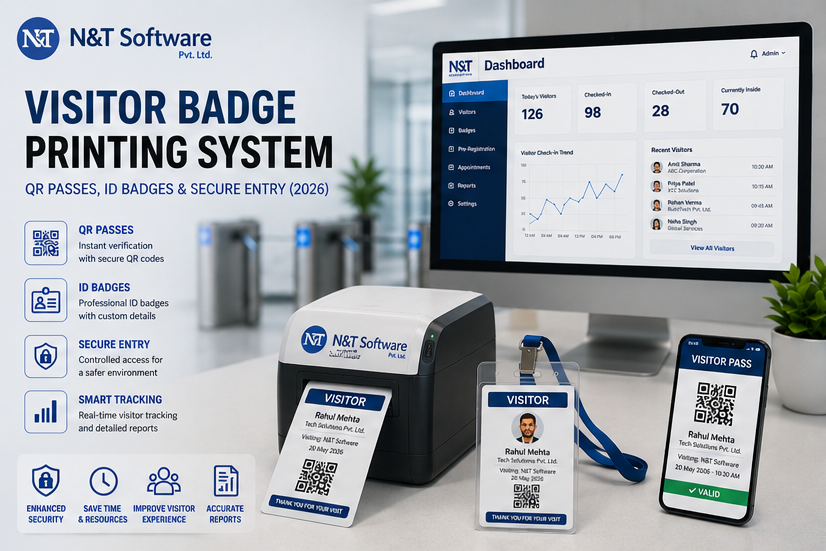
A complete 2026 guide to visitor badge printing systems, covering QR visitor passes, temporary ID badges, printer types, badge design, privacy, access-control integration and secure entry.
A visitor badge looks simple: a name, company, photograph and perhaps a QR code printed on a small label or card. Behind that badge, however, should be a complete chain of registration, approval, identity verification, access authorization, expiry, check-out and audit records.
A visitor badge printing system converts an approved visitor record into a visible and scannable temporary credential. It can produce adhesive visitor labels, paper passes, reusable ID cards or digitally delivered QR passes for offices, factories, hospitals, schools, data centres, events, warehouses and multi-tenant buildings.
The badge helps employees and security teams recognize authorised visitors, but it should never be treated as proof of unlimited access. A secure badge must be linked to a valid visit, limited by time and destination, difficult to copy or reuse, and immediately revocable when the visit changes or ends.
This global 2026 guide explains how visitor badge printing software works, which printer and badge types are available, what information a visitor pass should display, how to secure QR credentials, how badges integrate with access control, and how organisations should implement a reliable badge workflow.
Table of Contents
- What a Visitor Badge Printing System Is
- How Visitor Badge Printing Works
- QR Passes, Printed Badges and Reusable Cards Compared
- What Information a Visitor Badge Should Include
- Visitor Badge Printers and Materials
- Secure QR Code Design
- Badge Design for Different Visitor Types
- Access-Control Integration
- Industry Use Cases
- Privacy, Security and Retention
- Implementation Best Practices
- Common Mistakes
- Visitor Badge Trends for 2026
- How to Choose a Provider
- Frequently Asked Questions
Quick Answer: What Is a Visitor Badge Printing System?
A visitor badge printing system is software and hardware that creates temporary visitor credentials from an approved registration record. The badge can display identity and visit details, contain a QR code or barcode, support gate or door verification, expire automatically and connect the physical pass to a searchable visitor audit trail.
Modern systems usually combine a visitor management platform, reception or kiosk device, badge template, printer or digital-pass service, QR scanner and optional access-control integration. The safest design separates three functions:
- Visible identification: Employees can see that the person is a visitor, contractor, vendor or temporary worker.
- Digital authorization: The QR code or badge number is linked to an approved record with defined dates, times, locations and status.
- Physical enforcement: Security staff, scanners, turnstiles or door systems decide whether the current credential is valid at that point.
A printed badge without a live authorization check can still be copied, altered or used after expiry. A digital QR pass without visible identification can be difficult for staff to monitor inside the facility. Many organisations therefore use both.
What Is Visitor Badge Printing Software?
Visitor badge printing software is a feature within a visitor sign-in or visitor management system that automatically generates a badge after registration and approval. Instead of asking reception staff to type information into a separate label program, the software uses data already collected during check-in.
The workflow can print different templates based on visitor type, site, host, destination, risk level or access zone. A client meeting badge may show the visitor’s name and host. A contractor badge may also show employer, trade, work zone, supervisor and expiry. A hospital visitor pass may show the approved department and visiting window without exposing sensitive patient information.
The software should also control who may print, reprint, cancel or override a badge. Every badge event should be associated with a user, device, time and visitor record so that unauthorised printing or repeated reprints can be investigated.
How a Visitor Badge Printing System Works
1. Visitor Pre-Registration
The host, department or visitor creates an expected visit. The record includes the location, date, time, purpose, visitor category and approval requirements.
2. Arrival and Check-In
The visitor scans a QR invitation, enters details at a self-service kiosk or completes an assisted check-in with reception or security. Review the complete visitor sign-in and digital registration guide for check-in options.
3. Verification and Approval
The system checks the invitation, required fields and approval status. Depending on risk, the organisation may verify identity, request a host response or apply watchlist and restricted-visitor rules.
4. Badge Template Selection
The system selects the correct layout for the location and visitor type. Colour, wording and displayed fields can change for guests, contractors, vendors, interview candidates, drivers, VIPs and recurring visitors.
5. Credential Generation
The platform creates a unique badge number and, where used, a QR code or barcode linked to the approved visit. The badge receives a validity period and access scope.
6. Printing or Digital Delivery
The credential is sent to a thermal label printer, card printer, standard office printer or the visitor’s mobile device. Critical sites should confirm successful printing before admitting the visitor.
7. Entry and Internal Verification
Security may scan the QR code at the gate or visually inspect the badge. Optional integrations can activate specific doors, lifts, parking areas or turnstiles for the approved period.
8. Check-Out and Revocation
When the visitor leaves, the system records check-out and deactivates the credential. Reusable cards should be returned, inventoried and reset before another visit.
QR Visitor Passes, Printed Badges and Reusable ID Cards Compared
What Information Should a Visitor Badge Include?
The badge should display enough information for identification and access decisions, but no more. Common fields include:
- Visitor name
- Visitor photograph where necessary and lawful
- Company or organisation
- Host, department or tenant
- Approved destination or zone
- Visitor category
- Date and issue time
- Clear expiry time or validity period
- Badge number
- QR code or barcode linked to the live record
- Escort required, where applicable
- Emergency or return instructions in concise form
Avoid printing phone numbers, identity-document numbers, patient details, confidential meeting subjects, home addresses or unnecessary personal information. The badge is worn visibly and may be photographed or discarded, so it should contain less information than the protected visitor record.
Expiry Must Be Visible
Do not rely only on a colour that changes daily. Show the actual date and time so staff can identify an expired pass even when they do not know the colour schedule.
Visitor Type Must Be Clear
Use readable words such as VISITOR, CONTRACTOR, VENDOR, DRIVER or INTERVIEW rather than colour alone. This improves clarity for colour-blind users and reduces staff confusion.
The QR Code Should Not Contain Personal Data
The QR code should contain an unpredictable token or credential reference. When scanned, the system checks the live server-side status and shows only information appropriate to the scanning user.
Visitor Badge Printers and Materials
The right printer depends on badge life, daily volume, required durability, print quality, network architecture and the availability of local consumables. A premium card printer is unnecessary for a two-hour office visit, while a lightweight label may be unsuitable for a contractor working outdoors for several weeks.
Direct Thermal Badge Printers
Direct thermal printers use heat-sensitive label stock and do not require ink or ribbon. They are widely used for short-term visitor badges because they print quickly, have relatively few consumables and can sit beside a reception tablet or kiosk.
Best for: same-day visitors, hospitals, offices, schools, events and high-volume reception.
Considerations: thermal images can fade with heat, sunlight, friction or time. Confirm label size, adhesive performance, print darkness, browser or driver support and local stock availability.
Thermal Transfer Printers
Thermal transfer printers use a ribbon to apply a more durable image to labels or cards. They are appropriate when badges must remain readable for days or weeks or face harsher conditions.
Best for: construction sites, industrial projects, outdoor contractors and longer temporary assignments.
Considerations: ribbon management, higher consumable complexity and printer maintenance.
Plastic ID Card Printers
Card printers can create durable PVC-style credentials with photographs, colour branding, barcodes, magnetic stripes or encoded contactless chips. They may print single-sided or dual-sided cards.
Best for: recurring contractors, temporary workers, caregivers, long projects and facilities using card-reader access.
Considerations: higher equipment cost, card inventory, secure blank-card storage, print ribbons, rejected-card disposal and card return.
Standard Office Printers
A laser or inkjet printer can create paper visitor passes, especially during low-volume operations or as a contingency. It is less convenient for immediate adhesive badges and may require cutting, folding or holders.
Digital-Only Visitor Passes
Some facilities send the credential directly to a mobile device. This removes printer dependency but does not provide visible identification once the visitor is inside. The organisation may still need wristbands, colour-coded lanyards or staff escort rules.
Badge Stock, Adhesives and Holders
Adhesive Labels
Choose stock that adheres to typical clothing without damaging fabric or falling off quickly. Test uniforms, synthetic fabrics, protective clothing and humid conditions. Avoid overly aggressive adhesives where visitors may attach badges to delicate garments.
Self-Expiring Badges
Some badge materials reveal an expiry mark or colour after activation. They can help employees detect an old badge, but the visible indicator should complement—not replace—digital expiry and check-out.
Reusable Holders and Lanyards
Reusable holders reduce waste but require return, cleaning and inventory processes. Lanyard colours can indicate visitor type, yet text and expiry should remain readable because colour alone is not sufficient.
Wristbands
Wristbands can be useful for events, healthcare, tours and high-movement environments. Tamper-evident or single-use designs reduce transfer, but printing space is limited.
How to Secure QR Visitor Passes
A QR code is a carrier, not a security control by itself. The security comes from what the code references, how the server validates it and what happens after it is scanned.
Use a Random, Unpredictable Token
Do not encode a visitor name, email, phone number, sequential badge number or database ID directly. Use a high-entropy token that cannot be guessed by changing a few characters.
Validate Against Live Server Status
The scanner should confirm that the visitor is approved, within the valid time window, at the correct location and not already cancelled, checked out or revoked.
Apply Short Validity Windows
A pre-arrival QR invitation may become active shortly before the expected visit. The entry credential should expire after the visit window and may become single-use at the first controlled entry point.
Related Visitor Management Resources
Visitor Sign-In System Guide — Plan registration, check-in and badge printing.
Contractor Visitor Management System Guide — Link contractor badges with safety and gate-pass controls.
Gate Security Management System Guide — Connect QR credentials with gates and access control.
Face Recognition Visitor Management Guide — Review identity verification and privacy.
N&T Software Visitor Management System — Explore QR check-in, badge printing, approvals and reports.
Request a Visitor Badge Printing Demo
Contact N&T Software to discuss badge types, printers, visitor volume, QR validation, access control and multi-location requirements.