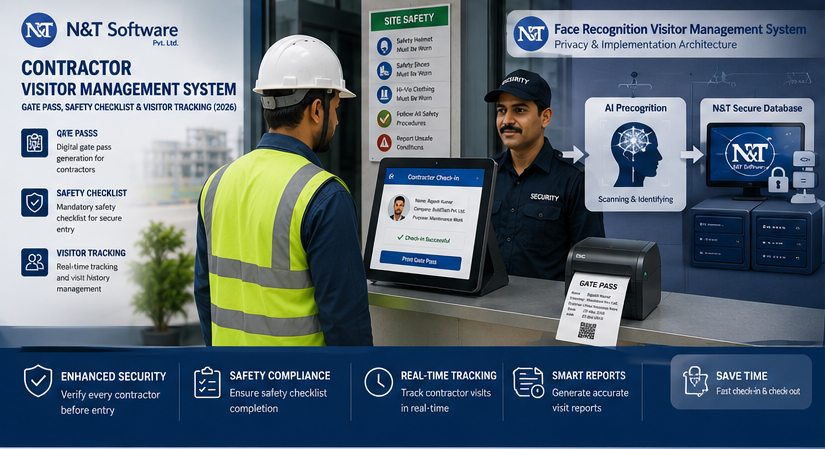
A complete 2026 guide to contractor visitor management systems, covering contractor onboarding, digital gate passes, safety checklists, permit controls, compliance documents, vehicles and live worksite tracking.
Contractors keep factories, plants, warehouses, construction sites, utilities, hospitals, campuses and commercial facilities running. They install equipment, repair critical systems, carry out shutdown work, deliver specialist services and enter areas that ordinary visitors never access.
That makes contractor entry fundamentally different from normal guest check-in. A scheduled client may need a host approval and a temporary badge. A contractor may also need company prequalification, identity verification, insurance, trade licences, medical or training records, site induction, a safety checklist, a work order, a permit-to-work reference, tools and vehicle declarations, restricted-zone authorization and proof that every worker has left the site.
A contractor visitor management system connects those requirements to the physical gate. It helps an organisation decide whether a contractor is eligible to arrive, whether a specific worker is authorised to enter, what work and zones are permitted, which documents are expiring, and who is currently on-site.
This global 2026 guide explains contractor onboarding, digital gate passes, safety checklists, permit controls, QR credentials, vehicle entry, worksite tracking, emergency accountability, implementation and vendor selection. It is intended for security, EHS, HSE, facility, operations, maintenance, procurement, IT and contractor-management teams.
Table of Contents
- What a Contractor Visitor Management System Is
- Why Contractor Entry Requires a Separate Workflow
- How Contractor Management Works from Prequalification to Exit
- Digital Contractor Gate Passes
- Safety Checklists and Site Induction
- Gate Pass vs Permit to Work
- Contractor Visitor Tracking
- Key Features and Benefits
- Industries That Use Contractor VMS
- Privacy, Security and Access Control
- Integrations
- Implementation Framework
- Best Practices and Common Mistakes
- 2026 Trends
- Provider Selection and FAQs
Quick Answer: What Is a Contractor Visitor Management System?
A contractor visitor management system is software that prequalifies contractor companies, registers individual workers, checks documents and training, records safety induction, routes approvals, issues time- and zone-limited gate passes, tracks contractors on-site and creates auditable entry, work and exit records.
The software can block entry when a required licence, insurance certificate, induction or approval has expired. It can also show security and emergency teams which contractors are inside, their employer, supervisor, work area, expected exit time and current status.
A contractor VMS supports policy execution, but it does not replace competent safety assessment, legal duties, supervision or a permit-to-work system. A green gate-pass status means the configured entry conditions were satisfied; it does not automatically mean the work itself is safe to start.
What Is Contractor Visitor Management Software?
Contractor visitor management software manages third-party companies and their personnel before, during and after site access. It combines elements of visitor registration, contractor compliance, digital gate-pass management, safety induction, access control and workforce presence tracking.
The system typically creates two linked records:
- Contractor company record: legal name, services, approved scope, insurance, safety performance, certifications, contracts, risk class and authorised contacts.
- Individual contractor record: identity, employer, trade, competencies, licences, induction, medical or fitness requirements where lawful, work assignment, supervisor, access zones and gate history.
Separating company and worker records matters. An approved contractor company may still send a worker whose licence or site induction has expired. Equally, a qualified worker should not enter under an unapproved employer or for work outside the authorised scope.
Why Contractor Entry Needs More Than a Standard Visitor Sign-In
Contractors Perform Work, Not Just Visits
They may interact with machinery, energy sources, chemicals, roofs, electrical systems, confined spaces, production lines or patients. Entry controls must reflect the task and its hazards.
Requirements Change by Trade and Risk
An office IT technician, crane operator, electrician, cleaner and shutdown-maintenance team should not complete the same checklist. The workflow should change by contractor category, work order, location and risk level.
Company Approval Does Not Equal Worker Approval
Insurance and contracts may be current while an individual competency card has expired. The gate should evaluate both levels.
Contractors Can Introduce New Hazards
Hot work, lifting, excavation, temporary power, chemicals, scaffolding and vehicle movement can affect employees and other contractors. The host organisation and contractor must exchange relevant hazard and emergency information.
Emergency Teams Need Accurate Presence Data
During an evacuation or incident, a paper register cannot reliably show contractor teams, work zones, supervisors and missed check-outs. A live contractor list improves accountability.
How a Contractor Visitor Management System Works
A strong contractor-management workflow starts before the first worker reaches the gate.
1. Contractor Company Prequalification
Procurement, operations or EHS reviews the contractor’s approved services, insurance, safety programme, incident history, certifications, legal documents, references and subcontracting arrangements. Requirements should be proportionate to the work risk.
2. Individual Worker Onboarding
The contractor uploads or enters each worker’s identity, role, trade, contact details, emergency information and required credentials. The organisation should collect only information necessary for access, safety and compliance.
3. Document and Expiry Validation
The system checks whether required records are present and current. Examples include trade licences, equipment operator cards, training certificates, insurance, work permits, health clearances where lawful, driving licences and site-specific authorisations.
4. Risk Classification
The contractor, task and work area are assigned a risk level. Low-risk service visits may follow a shorter workflow; high-risk work can require EHS review, additional induction, permits and restricted access.
5. Site-Specific Induction
Workers complete relevant orientation covering emergency alarms, assembly points, prohibited areas, traffic routes, PPE, incident reporting, stop-work expectations and local hazards. Completion and understanding should be recorded.
6. Work Order and Supervisor Approval
The visit is linked to a valid work order, project, shutdown activity or service request. An authorised host or site supervisor confirms dates, scope, crew, zone and expected duration.
7. Permit and Safety-Control Check
Where applicable, the system verifies that the correct permit-to-work process exists for hot work, confined-space entry, excavation, isolation, electrical work, work at height or other controlled activities. The VMS may reference permit status, but safety personnel remain responsible for permit validity and field conditions.
8. Arrival and Identity Verification
At the gate, security scans a QR invitation, verifies identity or searches the approved worker record. Optional ID, OTP or facial verification can be used only after legal, privacy and proportionality review.
9. Gate Pass Issuance
An approved contractor receives a printed badge, QR pass, temporary card or mobile credential. The pass identifies the employer, work area, supervisor, validity and access restrictions.
10. On-Site Tracking and Exit
Entry is recorded in real time. Zone scans, supervisor updates or access-control events can refine location visibility. At departure, tools, materials, passes and vehicles are reconciled where required, and the contractor checks out.
Digital Contractor Gate Pass System
A contractor gate pass is a temporary access credential connected to an approved company, worker, task, location and time window. It may be printed as a badge, displayed as a QR code, stored as a mobile credential or linked to a temporary access card.
What a Contractor Gate Pass Should Show
- Contractor name, photograph and company
- Worker category or trade
- Authorised site, gate, building or work zone
- Host, project manager or site supervisor
- Work order or project reference
- Issue date, valid-from time and expiry
- QR code or pass number linked to the secure system record
- Visible restrictions, such as “escort required” or “no production access”
- Emergency or help instructions where appropriate
The physical badge should display only information needed for identification and access. Sensitive personal details, identity-document numbers and medical information should not appear on the pass.
Common Types of Contractor Gate Passes
QR Gate Passes
A secure QR pass can speed up entry, but the code should contain an unpredictable token rather than readable contractor data. It should be time-limited, revocable and linked to current approval status. A screenshot or forwarded code should not be enough to bypass identity verification when the site risk requires a stronger check.
Multi-Gate and Anti-Passback Controls
Large sites may have separate pedestrian, vehicle, loading and restricted-area gates. The VMS should record which entry point was used and prevent inconsistent states, such as the same credential appearing to enter twice without an exit. Access-control integration can improve this, but exception handling is still needed for tailgating, emergency exits and manual overrides.
Contractor Safety Checklist and Site Induction
A contractor safety checklist confirms that defined entry and work-readiness controls have been reviewed. The checklist should be specific to the site, contractor category, task and date. A generic “I agree to be safe” checkbox has little operational value.
Pre-Entry Safety Checklist
- Contractor company and worker approval are current.
- Identity and employer relationship are verified.
- Required licences, competencies and training are valid.
- Site induction is complete and not expired.
- Work order, scope, dates and supervisor are confirmed.
- Required PPE is available and appropriate.
- Emergency alarms, assembly points and reporting routes are understood.
- Vehicle, equipment, tools and chemicals are declared where required.
- Relevant risk assessment, method statement or job-safety analysis has been reviewed.
- Permit-to-work requirements have been identified.
Task-Specific Safety Checklist
Higher-risk activities need additional controls. The system may route the contractor to checklists or permits for:
- Hot work and fire watch
- Confined-space entry and rescue planning
- Electrical work and energy isolation
- Lockout/tagout or other isolation procedures
- Work at height, ladders, scaffolds and fall protection
- Excavation and underground services
- Lifting operations, cranes and rigging
- Hazardous chemicals and safety data sheets
- Line breaking or opening process equipment
Related Visitor Management Resources
Visitor Badge Printing and QR Pass Guide — Create secure contractor credentials.
Gate Security Management System Guide — Connect approvals, passes and access control.
Visitor Sign-In System Guide — Compare registration and check-in workflows.
Visitor Data Privacy and Retention Guide — Protect contractor records and documents.
N&T Software Visitor Management System — Explore multi-location approvals, alerts and reporting.
Book a Contractor Management Demo
Contact N&T Software to discuss contractor types, documents, safety rules, sites, gates, approval roles and integrations.