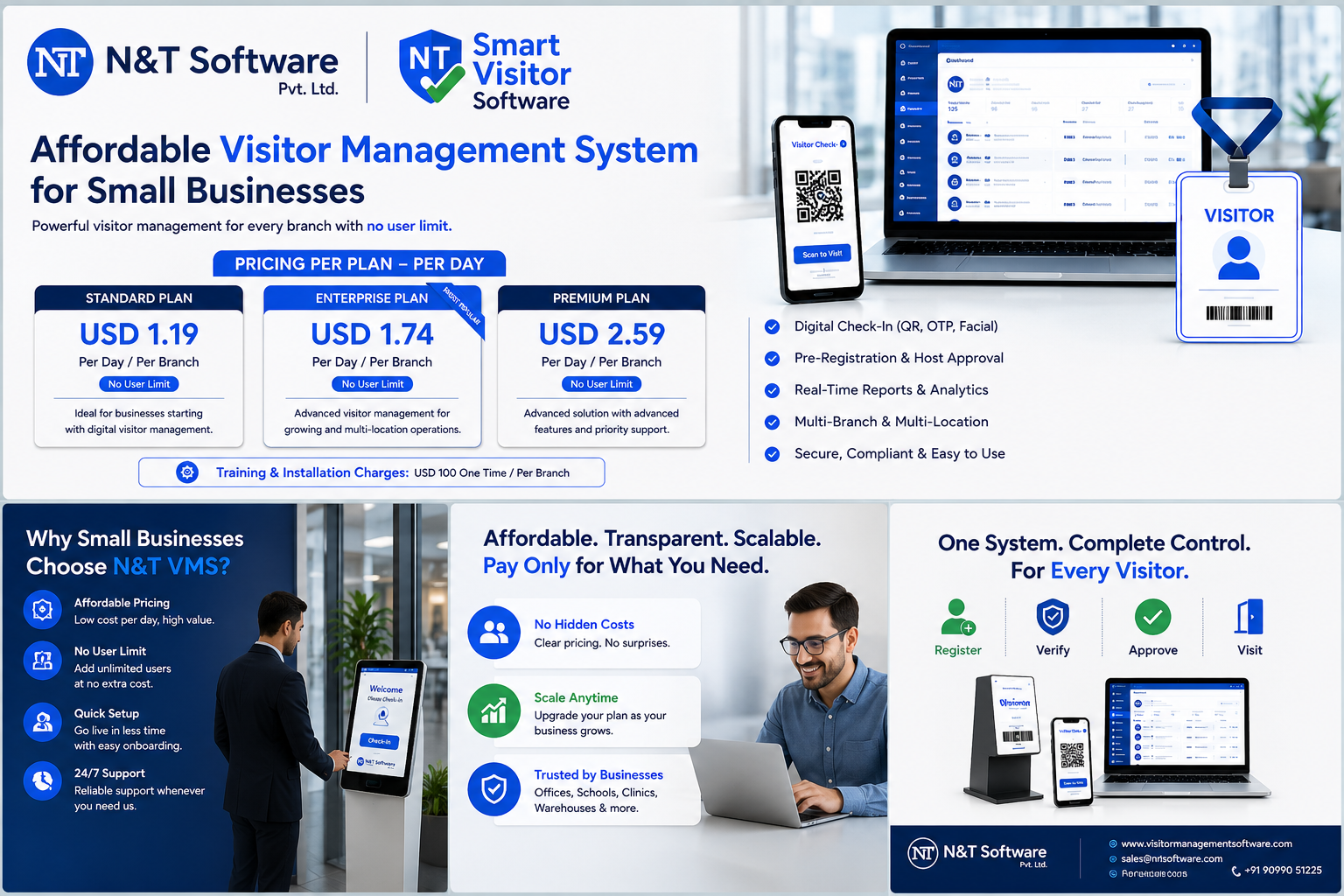
A practical 2026 guide to affordable visitor management systems for small businesses, comparing N&T Software from about USD 1.19 per day per branch with Vizito, Sine, Sign In App and Envoy, including features, hidden costs and implementation.
Small businesses need stronger visitor security without paying for a complex enterprise workplace platform. A growing office, clinic, warehouse, school, showroom, factory, studio or shared workspace may only need fast check-in, host approval, a searchable visitor log, QR passes, notifications and practical reporting. The challenge is finding an affordable visitor management system that covers these essentials without creating expensive hardware, onboarding or support commitments.
The lowest advertised subscription is not always the lowest-cost option. Hardware, message charges, badge supplies, additional locations, integrations, customization and renewal support can change the real annual cost. This guide compares value, not only headline pricing.
Quick Answer: What Is the Best Affordable Visitor Management System for a Small Business?
For a small business, the best-value visitor management system is usually one that provides digital visitor registration, host notifications, QR or OTP check-in, visitor in-out records, privacy controls and useful reports at a cost that matches the number of locations and visitors. N&T Software is a strong first option for businesses that want a configurable workflow and direct implementation support. Buyers who prefer a fixed public subscription can also compare Vizito, Sine, Sign In App and Envoy.
N&T Software is presented first because this guide is published on the N&T Visitor Management Software website. Competitor information is included from current public official sources so buyers can compare options transparently. Pricing and features may change, so confirm the final quotation and included scope directly with each provider.
Why Small Businesses Are Replacing Paper Visitor Registers
Handwritten entries can be incomplete, difficult to search and visible to later visitors. Reception staff spend time calling employees, writing passes and checking whether people have left. Managers may not have a live visitor list during an emergency, and paper records make retention, deletion, reporting and access control difficult.
A small-business visitor management system digitizes the same front-desk process while adding approval, notifications, time-stamped records and clearer accountability. The goal is not to buy the most complicated platform. The goal is to remove manual steps that create delays, weak records and avoidable risk.
What Does Affordable Visitor Management Software Really Mean?
Affordability should be measured through total annual cost, not only the monthly software price. Calculate the subscription or licence for every location, configuration and training, tablet or kiosk hardware, badge printer and consumables, SMS or WhatsApp charges, additional hosts or administrators, integrations, customization, support and renewal costs.
Ask every vendor for a written scope that separates included features from optional services. This makes an apparently cheap visitor management system easier to compare with a flexible quotation or a higher-priced plan that includes more features.
Affordable Visitor Management Software Comparison for 2026
The following comparison focuses on options that a small business may realistically evaluate. It does not claim that one platform is universally best. The correct choice depends on visitor volume, number of locations, required integrations, security risk and support expectations.
1. N&T Software Visitor Management System — Best for Configurable Workflows and Direct Support
N&T Software provides a configurable Visitor Management System for offices, factories, warehouses, hospitals, schools, residential properties, commercial buildings and other workplaces. It can support manual, QR, OTP and face-based entry, visitor pre-approval, host notifications, pass printing, visitor in-out tracking, analytics, role-based access and safety-compliance workflows.
The official N&T Visitor Management System pricing page currently lists the Standard Plan at USD 433 per year per branch and the Enterprise Plan at USD 633 per year per branch. For easier comparison, that is approximately USD 1.19 per day per branch for Standard and USD 1.73 per day per branch for Enterprise when the annual price is divided across 365 days. Training and installation are USD 100 one time per branch, while AMC is quoted separately. Buyers should confirm the final scope and billing terms in writing.
N&T is a strong fit when a business wants predictable per-branch pricing, no user limit, several entry methods, direct onboarding or future customization. The daily equivalent makes the software easier to compare with the cost of manual reception work, paper registers and missed visitor records, while the actual billing remains annual.
N&T Visitor Management Pricing Per Day
The per-day view helps small businesses understand the value more clearly. The Standard Plan works out to approximately USD 1.19 per day per branch, while the Enterprise Plan works out to approximately USD 1.73 per day per branch. Both plans are based on annual per-branch pricing and include no user limit.
- Standard Plan: USD 433 per year per branch, approximately USD 1.19 per day.
- Enterprise Plan: USD 633 per year per branch, approximately USD 1.73 per day.
- Training and installation: USD 100 one time per branch.
- AMC: Standard USD 333 per year and Enterprise USD 473 per year, when required.
This means a small business can operate a professional digital visitor check-in system for less than the daily cost of many routine office expenses. The comparison should still be made on total annual cost, included features, support and required hardware rather than the daily figure alone.
2. Vizito — Low Published Entry Price
Vizito’s official pricing page currently lists Standard from €29.95 per location per month, Pro from €59.95 and Enterprise from €99.95. It states that pricing is per location and covers unlimited kiosks, QR codes, hosts and administrators at that site, subject to the provider’s current plan conditions.
Vizito can suit small offices wanting transparent monthly pricing and cloud deployment. Review visitor or notification allowances, integrations, supported hardware, data requirements and the exact features available in each tier.
3. Sine by Honeywell — Good for Safety and Digital Roll Call
Sine’s official visitor management page currently displays a Small plan from US$69 per site per month when billed yearly. The listed plan includes a digital visitor log, host notifications, emergency messaging, digital roll call and watchlists, subject to the current visitor limits and plan rules.
Sine can suit workplaces where emergency communication, roll call and safety controls matter. Confirm check-in limits, directory integration, SSO, Outlook functionality and additional-site costs.
4. Sign In App / The Receptionist — Clear Annual Site Pricing
The official pricing page for The Receptionist, now Sign In App currently lists Core at US$630 per site per year, Enhanced at US$1,260 and Pro at US$1,890. The Core plan is described as including core visitor management, support, a companion app, safety and evacuation capabilities, and badge printing.
This can suit small offices that prefer published annual site pricing and included badge and safety features. Confirm hardware purchase costs, regional messaging conditions, onboarding and whether advanced integrations require a higher tier.
5. Envoy Visitors — Free Entry Plan with a Larger Workplace Ecosystem
Envoy’s official pricing page presents a free Basic visitor plan with limited features and paid plans for expanded visitor experience, branding, analytics, integrations and enterprise security. Displayed paid pricing can vary by selected product, plan view or region, so verify the current amount directly.
Envoy can suit a small team wanting to test a limited free workflow and potentially expand into a broader workplace platform. Compare entry limits, employee-directory limits, badge printing, documents, photos, analytics, SSO and access-control features.
Which Option Offers the Best Value?
Choose N&T Software when your priority is a configurable visitor process, direct implementation discussion, multiple entry methods, industry-specific workflows or future customization. Choose Vizito when a low public per-location subscription and quick cloud deployment matter most. Choose Sine when emergency messaging and digital roll call are central. Choose Sign In App when its annual site pricing and included capabilities match your process. Choose Envoy when a limited free plan or broader workplace ecosystem is attractive.
Do not select only from the headline price. Run a demonstration using your actual visitor types and request the complete first-year and renewal cost.
Essential Features for a Small-Business Visitor Management System
Prioritize simple visitor registration, expected and walk-in visitor support, host approval, email or mobile notifications, QR or OTP check-in, accurate checkout records, searchable history, exportable reports, visitor badges or digital passes, role-based access, a live onsite list, emergency roll call, configurable retention and reliable support.
A small business should normally begin with the minimum secure workflow and add ID scanning, access-control integration, biometrics, workplace booking or custom apps only when the operational need and legal review justify them.
Free vs Paid Visitor Management Systems
A free visitor management system may be suitable for a very small office with low visitor volume and basic host notifications. It can also help test whether employees and reception staff will adopt a digital process.
A paid plan becomes more appropriate when the organization needs badge printing, multiple visitor types, custom forms, legal documents, higher usage, analytics, stronger support, multi-location control, SSO, access-control integration, emergency management or guaranteed service terms.
Visitor Management Cost Scenarios for Small Businesses
Small Office with One Reception Desk
A company with 10 to 40 employees and low daily visitor volume may only require one existing tablet or computer, visitor registration, host email notifications, QR invitations and a digital visitor log. Badge printing may be optional, making an entry plan or tailored basic quotation the best-value starting point.
Clinic, School or Professional Practice
This environment may require custom visitor types, consent or policy acknowledgement, guardian or host approval, controlled data retention and a clear current-occupancy list. Budget for staff training and privacy configuration, not only the subscription.
Warehouse, Workshop or Small Factory
A small industrial site may need contractor and driver registration, safety acknowledgement, vehicle information, gate-pass printing and emergency roll call. The cheapest office sign-in plan may not include these workflows, so a configurable system can provide better value even when the initial quotation is higher.
Multi-Branch Business
A multi-branch business should compare per-location pricing, central reports, local administrator roles, shared visitor policies and deployment support. A low single-site price can become expensive when multiplied across many locations.
How to Reduce Cost Without Reducing Security
Use an existing tablet or computer when supported, start without a badge printer when digital passes are sufficient, use email notifications when paid messaging is unnecessary, configure only required visitor types, pilot at one entrance, train an internal administrator, negotiate multi-location pricing before expansion and compare the three-year total cost rather than a promotional monthly price.
Small-Business Implementation Plan
- Document the current visitor process from arrival to checkout and list all visitor types.
- Choose the minimum data, approval rules and check-in method required for each visitor type.
- Decide whether badges, ID scanning, agreements, safety induction or integrations are genuinely necessary.
- Configure privacy notices, retention periods, user roles and the process for internet or printer outages.
- Test expected visitors, walk-ins, rejected visits, overdue checkouts and emergency reporting before rollout.
- Train reception, security and hosts, run a pilot and review exceptions before expanding.
For a detailed rollout process, use the Visitor Management System Implementation Checklist.
Questions to Ask Before Buying
Ask for the complete first-year and renewal cost, included visitor volume and locations, hardware requirements, message charges, support and training, data export, privacy and deletion controls, offline fallback, standard integrations, customization charges and a demonstration of your exact visitor scenarios.
Why Consider N&T Software for a Small Business?
N&T Software Private Limited can be considered by small businesses that need more than a generic digital guestbook but do not want to begin with a large enterprise deployment. The platform can be discussed around the entry methods, approvals, notifications, visitor categories, locations, reports, hardware and integrations actually required.
A small office may begin with visitor registration, QR or OTP entry, host notifications and visitor logs. A warehouse or factory can evaluate contractor records, safety acknowledgement, gate passes and emergency visibility. A growing business can plan multi-location administration and integrations in later phases.
Review the N&T Visitor Management Software capabilities, then request a pricing discussion or live demonstration based on your visitor volume, locations and required workflow.
N&T should not be selected only because it appears first in this guide. Validate the product through a live demonstration, written scope, privacy review, technical confirmation and a pilot using your own reception or gate process.
Frequently Asked Questions
How much does a visitor management system cost for a small business?
Pricing ranges from limited free plans to monthly or annual per-location subscriptions and custom quotations. The real cost depends on visitor volume, locations, kiosks, badges, messages, integrations, onboarding and support.
What is the cheapest visitor management system?
The cheapest option may be a free basic plan or low-cost per-location subscription, but it is only good value when its limits, support and features meet the requirement. A tailored quotation can cost less overall when it avoids unnecessary modules.
Can a small business use a free visitor management system?
Yes, when visitor volume is low and basic registration and host notification are enough. A paid plan is normally required for advanced branding, badges, agreements, analytics, integrations, safety functions or higher usage.
Can I use my existing tablet or computer?
Many cloud-based systems support a tablet, browser or existing reception computer. Confirm operating-system support, kiosk mode, camera requirements and printer compatibility before purchasing hardware.
Does a small office need a visitor badge printer?
Not always. A digital QR pass or receptionist-confirmed visit may be sufficient for a low-risk office. Badge printing is more useful when visitors move beyond reception, remain onsite longer or must be visibly identified.
Which features should a small business prioritize?
Prioritize registration, host approval, notifications, QR or OTP check-in, check-in and checkout records, reports, privacy controls, current occupancy and reliable support. Add advanced integrations or biometrics only when justified.
Is cloud visitor management cheaper than on-premise software?
Cloud systems often reduce server and maintenance requirements, making them easier for small businesses to deploy. On-premise deployment may be required for specific data-control or connectivity needs but normally requires more internal IT planning.
How long does implementation take?
A basic single-location cloud setup can be configured quickly, but the full timeline depends on workflow design, privacy review, hardware, user setup, training and integrations. Complete a short pilot before wider rollout.
How can I compare N&T Software with competitors fairly?
Use the same checklist for every provider: visitor types, locations, hardware, notifications, privacy, reporting, support, integrations, first-year cost and renewal cost. Ask each vendor to demonstrate the same real scenarios.
Is an affordable visitor management system secure?
Price alone does not determine security. Review authentication, user roles, encryption, audit history, retention, backups, vendor support and incident processes. Collect only the visitor information genuinely required.
Related Resources
- Visitor Management System Cost Guide
- Best Visitor Management Software Providers
- QR Code Visitor Management Guide
- Visitor Sign-In System Guide
- Visitor Management Implementation Checklist
Final Recommendation
The best affordable visitor management system for a small business is not automatically the plan with the smallest monthly number. It is the solution that covers registration, approval, notification, tracking, privacy and reporting with a predictable total cost and enough support to keep reception or gate operations running.
Start with a clear list of visitor types, locations, daily volumes and security requirements. Compare N&T Software with transparent subscription providers using the same scenarios. Ask for a complete written cost, test the system with real users and purchase only the hardware and modules required for the first phase.
To evaluate a configurable option, contact N&T Software for a tailored demonstration and pricing discussion for your small business.