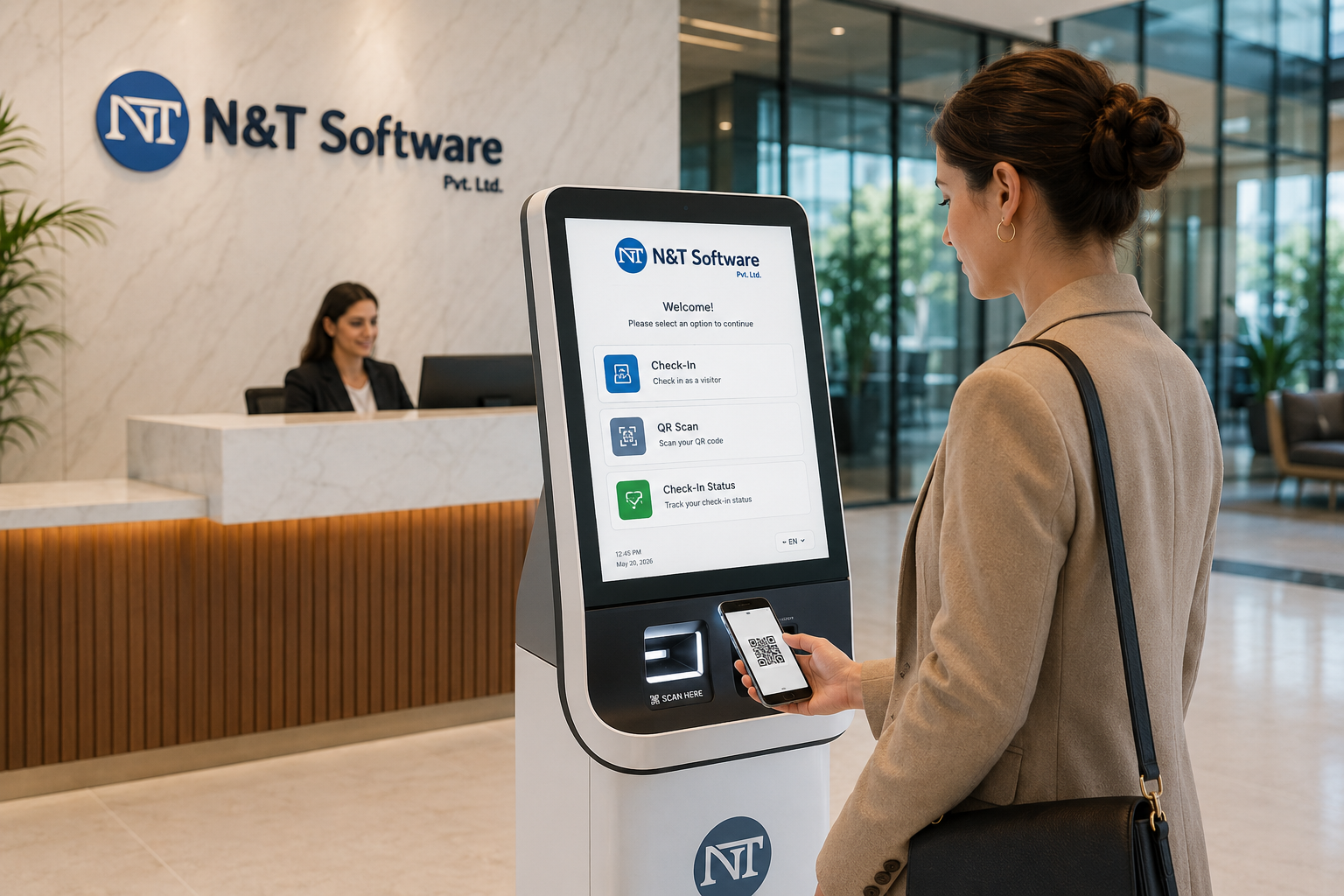
A complete 2026 buyer and implementation guide to self-service visitor check-in kiosk software, covering tablet and floor-standing kiosks, QR arrivals, walk-in registration, ID and photo capture, host approval, badge printing, accessibility, security, integrations, hardware, rollout and pricing.
A self-service visitor check-in kiosk allows expected guests and walk-in visitors to register at reception, a security gate or a lobby entrance without depending on a staff member for every data-entry step. The kiosk can run on a tablet, touchscreen terminal or other secured device connected to visitor management software.
A well-designed kiosk does more than replace a paper register. It can recognize a pre-registered guest, collect a walk-in visitor’s details, request host approval, capture a photo or signature, print a badge, notify the host and maintain a searchable entry and checkout record.
Quick answer: The best visitor management kiosk software combines fast self-check-in with approval controls, unique QR or OTP verification, privacy-aware data collection, badge printing, host notifications, accessibility and reliable reception or security fallback procedures.
What Is a Self-Service Visitor Check-In Kiosk?
It is a visitor-facing device and software workflow used to register, verify and check in guests. The visitor interacts with a guided screen rather than completing a paper log or giving every detail verbally to reception.
The kiosk is normally part of a wider visitor management platform. Administrators configure forms, visitor types, approval rules, locations, badge templates, notifications, retention periods and integrations from a central dashboard.
Why Kiosk-Based Visitor Management Is in Demand
Modern offices and facilities need a check-in process that remains efficient during reception peaks, staff breaks and busy gate-entry periods. A kiosk can handle routine registration consistently while reception and security staff focus on exceptions, assistance and physical security.
- Faster processing for pre-registered visitors with QR codes or invitation details.
- A consistent registration form for every visitor type and location.
- Reduced manual typing and fewer incomplete or unreadable visitor records.
- Automatic host notifications, approvals and visitor pass generation.
- A more professional and measurable front-desk experience across multiple sites.
How the Visitor Kiosk Workflow Works
1. The visitor selects the check-in method
The welcome screen can offer options such as scan invitation QR code, enter mobile number, enter OTP, search for a host or register as a walk-in visitor. The available choices should depend on the site’s policy rather than exposing every possible workflow.
2. The system finds or creates the visit
A pre-registered visitor is matched with the approved invitation. A walk-in visitor completes the required form, selects the host or department and provides only the information necessary for the visit.
3. Required declarations and verification are completed
Depending on the visitor type, the kiosk may request a photo, signature, identity verification, vehicle details, safety acknowledgement, NDA acceptance, health declaration or confirmation of site rules.
4. Approval is confirmed
The system checks whether the visit is already approved or sends a new request to the host, reception, security or department approver. The visitor should not receive access simply because the registration form was completed.
5. Badge or digital credential is issued
After approval, the kiosk can print a visitor badge or display a digital pass. The badge should clearly identify the visitor while avoiding unnecessary personal information and should expire automatically according to the approved visit.
6. Host notification and live tracking begin
The host is informed that the visitor has arrived, and the active visitor appears in the live occupancy list. Checkout later closes the visit and can revoke connected access permissions.
Read the Visitor Pre-Registration System Guide for the invitation and approval workflow that happens before kiosk arrival.
Types of Visitor Check-In Kiosks
Tablet reception kiosk
An iPad, Android tablet or supported touchscreen device is mounted on a counter or stand. This is often suitable for offices, clinics, schools, coworking spaces and locations that need a compact and flexible setup.
Floor-standing lobby kiosk
A larger freestanding kiosk can provide stronger visibility, larger touch targets and space for a camera, scanner or badge printer. It may be more suitable for high-traffic entrances and unattended reception areas.
Wall-mounted or gate kiosk
This layout is useful where floor space is limited or the device must be positioned close to a security gate. The installation should still allow comfortable access for different visitor heights and mobility requirements.
Guard-desk assisted kiosk
The visitor completes most registration steps on a screen while a security officer verifies documents, resolves exceptions and completes the final check-in. This hybrid approach is common where security controls are stronger than a normal office reception.
Visitor-owned mobile check-in
A facility QR code can open a mobile registration page on the visitor’s own phone. This reduces shared-device use, but organizations still need a clear method for verification, approval, badge issue and visitors who cannot or do not want to use a smartphone.
Essential Visitor Kiosk Software Features
- QR scanning for pre-registered and approved guests.
- Secure walk-in registration with host or department lookup.
- OTP, identity document, photo or other configured verification options.
- Host approval, denial, escalation and backup approver rules.
- Digital signature for NDAs, policies, safety instructions and declarations.
- Automatic badge printing with photo, host, purpose and expiry information.
- Email, SMS, WhatsApp or app notifications for hosts and security teams.
- Multi-language screens, configurable branding and accessible interface options.
- Live visitor list, overdue visitor alerts, reports and emergency occupancy.
See the QR Code Visitor Management System Guide for static and dynamic QR workflows, credential security and scanning considerations.
Hardware Checklist
The hardware should be selected after the workflow is defined. Buying an expensive kiosk first can create limitations if the required scanner, printer, operating system or mounting arrangement is incompatible with the software.
- Screen size, brightness, viewing angle and touch accuracy.
- Camera quality and positioning for visitor photo capture.
- QR, barcode or supported document scanner requirements.
- Thermal or label printer compatibility, print speed and consumable availability.
- Stable network connection, power protection and secure cable management.
- Tamper-resistant enclosure, locked ports and appropriate physical placement.
- Remote device monitoring, operating-system updates and application recovery.
Badge Printing at the Kiosk
Badge printing makes it easier for employees and security teams to identify approved visitors. The badge should use a clear template and show only the details needed for recognition and access control.
Organizations should define what happens when the printer is offline, labels run out or a badge is reprinted. Every reprint and manual override should be recorded, and used badges should be returned or visibly expired according to site policy.
Review the Visitor Badge Printing System Guide for badge content, QR passes, printer choices and expiry controls.
Security and Privacy Requirements
A kiosk is placed in a public or semi-public area, so both the device and the software require careful protection. The visitor should not be able to view previous records, exit the kiosk application, access operating-system settings or reuse another visitor’s credential.
- Use locked kiosk mode and restrict physical ports and administrative controls.
- Clear visitor data from the screen after each completed or abandoned session.
- Do not display a searchable list of employees or visitors beyond what the workflow requires.
- Encrypt data in transit and protect stored information with role-based access.
- Define retention and deletion rules for photos, identity documents, signatures and visit logs.
- Record approval, denial, edit, export, badge reprint and manual override activity.
Use the Visitor Data Privacy and Retention Guide when configuring collection, access, retention and deletion policies.
Accessibility and Visitor Assistance
Self-service should not mean assistance is unavailable. The kiosk interface should use readable text, clear contrast, large touch targets, simple instructions and a logical sequence. Physical placement should consider wheelchair users, shorter visitors and people who cannot comfortably use a standing screen.
Provide an assisted check-in alternative for visitors with visual, hearing, mobility, language, literacy or technology-access needs. Emergency contact or help options should be visible without exposing administrative functions.
Kiosk Integrations
Integration allows an approved kiosk check-in to trigger other controlled actions. For example, the platform may notify a host, print a badge, create a temporary access credential, update the live occupancy dashboard or record the visit in a central security system.
- Access control, turnstiles, smart doors, lifts and temporary credentials.
- Employee directories, HRMS and identity platforms for host information.
- Email, SMS, WhatsApp, Microsoft Teams or other approved notification channels.
- Badge printers, QR scanners, cameras and supported identity readers.
- Parking, meeting-room, CCTV event and emergency management systems.
Read the Visitor Management System Integration Guide for API, access-control, directory, CCTV and failure-handling considerations.
Industry Use Cases
Corporate offices and commercial buildings
A lobby kiosk can manage client meetings, interviews, vendors and business guests while routing each visitor to the correct host, tenant, floor or reception desk.
Factories, warehouses and construction sites
Kiosks can support contractor and vendor registration, safety declarations, gate selection, host approval and badge printing, with security officers handling identity checks and restricted access.
Hospitals and healthcare facilities
A healthcare visitor kiosk can guide patient visitors through destination selection, visiting rules, approval and pass issue while preserving privacy and supporting assisted registration.
Schools, colleges and campuses
Educational institutions can use kiosks for parents, vendors, contractors, interview candidates and official guests, with controlled host selection and campus-specific security workflows.
Government, banks and high-security facilities
The kiosk can collect information and start the visit, but stronger identity verification, multi-level approval, escort requirements and restricted-zone access should remain under authorized staff control.
Self-Service Kiosk vs Reception-Assisted Check-In
A kiosk is strongest for repetitive, predictable steps. Reception-assisted check-in is stronger for exceptions, sensitive visits, accessibility support, unusual documents and visitors who need guidance. Many organizations benefit from a hybrid process rather than removing reception completely.
The decision should be based on visitor volume, risk, staff availability, entry complexity and the amount of human judgment required. An unattended kiosk should never silently approve visitors merely to keep the queue moving.
Implementation Plan
- Map expected and walk-in visitor journeys for each location and entrance.
- Define required fields, approval levels, identity checks, badge rules and data retention.
- Select compatible tablet, kiosk, camera, scanner, printer and mounting hardware.
- Configure branding, languages, accessibility, notifications and integrations.
- Pilot the system using pre-registered, walk-in, denied, expired, group and assisted visitor scenarios.
- Document internet, printer, scanner, power and access-control failure procedures.
- Train reception, security, hosts and administrators before the wider rollout.
Use the Visitor Management Implementation Checklist to plan requirements, security testing, training, rollout and go-live.
Visitor Kiosk Software Pricing Factors
The total cost is usually affected by the number of locations and kiosks, visitor volume, administrator and host access, notification usage, badge printing, integrations, hardware, installation, branding, customization, hosting and support.
Compare proposals using the same scope. A low software subscription may exclude kiosk hardware, printer consumables, implementation, API integration, support or replacement devices. Request separate figures for recurring software, one-time setup, hardware and optional customization.
Review the Visitor Management System Cost and Pricing Guide for software, implementation, hardware, integrations and support cost categories.
Buyer Checklist
- Can pre-registered visitors scan a unique QR code without re-entering details?
- Can walk-in visitors be approved before a badge or credential is issued?
- Does the kiosk support your tablet, operating system, scanner and badge printer?
- Can the interface support multiple languages and assisted or accessible check-in?
- What data remains visible after a visitor abandons the process?
- Can administrators manage multiple locations without exposing unrelated visitor records?
- What happens if the internet, printer, camera, scanner or access-control integration fails?
- Does the platform provide a full audit history for approvals, edits, exports and overrides?
Why Consider N&T Software
N&T Software Private Limited’s Visitor Management System can be evaluated for self-service and reception-assisted visitor check-in using browser, tablet or supported reception devices. The workflow can include pre-registration, QR or OTP entry, host approval, visitor passes, badge printing, notifications, checkout tracking and multi-location reporting.
The demonstration should be based on your real entrance, visitor types, device plan, approval hierarchy, badge requirements, network conditions and security integrations. Hardware and integration compatibility should be confirmed before final deployment.
Frequently Asked Questions
Can a tablet be used as a visitor check-in kiosk?
Yes, when the visitor management software supports the device and the tablet is secured in kiosk mode. Confirm camera, QR scanning, printer connectivity, operating-system support and physical mounting before deployment.
Can visitors check in without a receptionist?
Routine expected visitors may complete most steps independently. Organizations should still provide assistance and require authorized review for walk-ins, sensitive visits, failed verification, accessibility needs and security exceptions.
Can a kiosk print visitor badges automatically?
Yes, when a compatible printer is connected and the approval workflow permits automatic printing. The system should prevent unauthorized printing and record reprints and manual overrides.
Does a kiosk support QR code visitor check-in?
Yes. A pre-registered visitor can scan a unique QR code to retrieve the approved visit and complete any final verification. The code should expire after cancellation, checkout or the approved time window.
How much does a visitor management kiosk cost?
Cost depends on the software plan, locations, number and type of kiosks, tablets or touchscreen hardware, cameras, scanners, badge printers, integrations, installation, customization and support. Request an itemized quotation based on the actual workflow.
Related Resources
- Visitor Sign-In System Guide — Digital registration, reception check-in and badge printing.
- Visitor Pre-Registration System Guide — Invitations, advance approvals, reminders and QR arrival.
- Visitor Badge Printing System Guide — Badge templates, QR passes, printers and secure entry.
- Visitor Management Integration Guide — Access control, turnstiles, directories, CCTV and APIs.
Final Recommendation
A visitor kiosk should make routine check-in easier while preserving meaningful security decisions. The strongest solution combines simple visitor screens, secure approval, QR recognition, badge printing, privacy protection, accessibility, reliable integrations and a clear assisted-check-in fallback.
Before purchasing hardware, test the complete workflow on the intended device. Include an approved visitor, a walk-in, a rejected request, an expired QR code, an inaccessible screen, a printer failure, an internet outage and a checkout. These scenarios reveal whether the kiosk will work safely in daily operations.
Contact N&T Software to discuss a self-service or reception-assisted visitor check-in kiosk for your office, facility, campus, factory or multi-location organization.