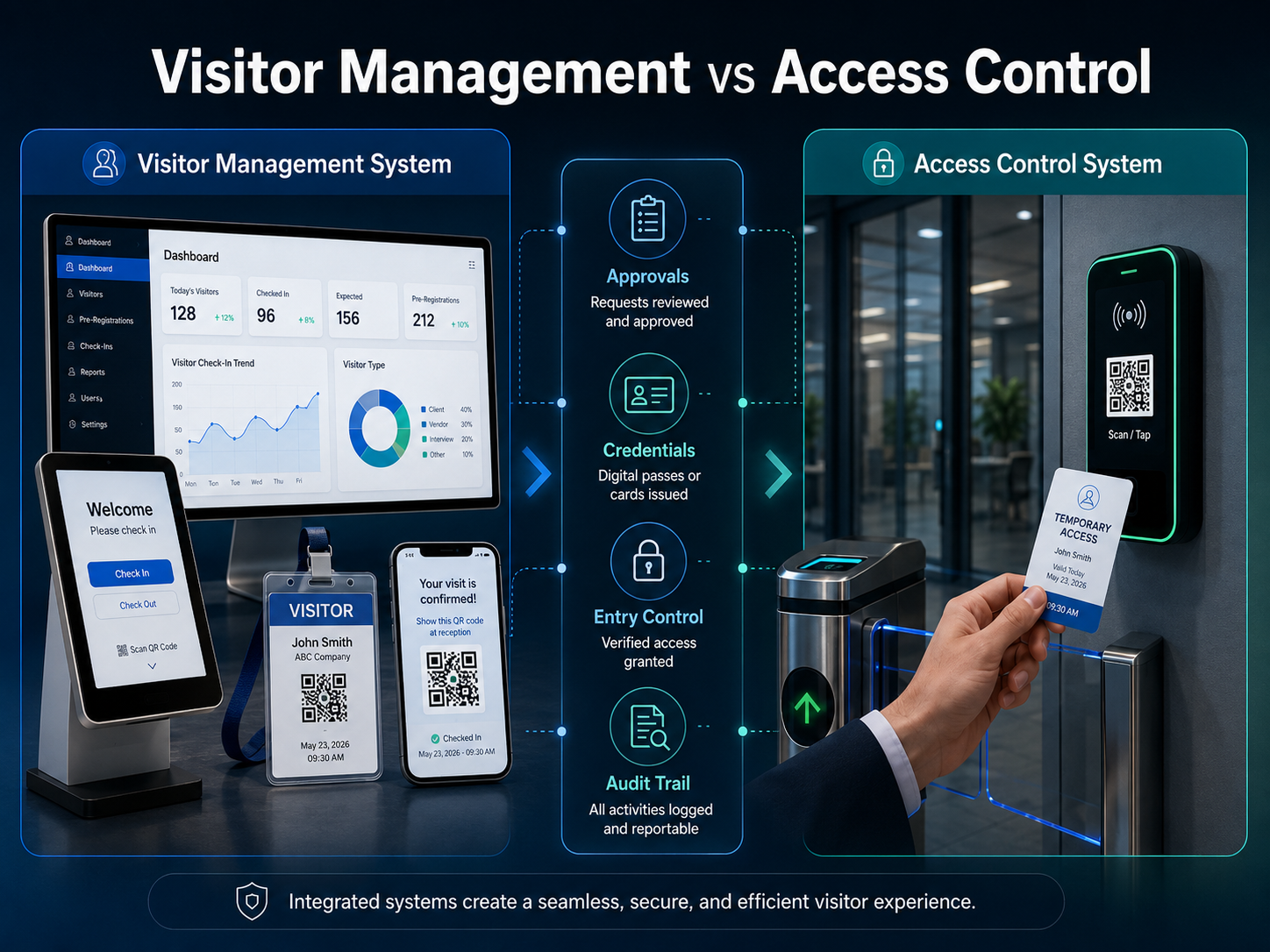
A practical 2026 comparison of visitor management systems and access control systems, covering their purposes, workflows, credentials, costs, integrations, security responsibilities and the best combined architecture.
Visitor management systems and access control systems are often discussed as if they solve the same problem. They do not. A visitor management system manages the visit: who is arriving, why they are coming, who approved them, what checks they completed and when the visit ends. An access control system enforces physical entry: which door, gate, lift, turnstile or restricted zone a credential may open.
Quick answer: visitor management vs access control
Visitor management software controls the visitor workflow and context. Access control controls the physical entry point. A visitor platform may approve a contractor for a two-hour visit, while the access control system decides whether the temporary QR code, badge, PIN or mobile credential can open the approved gate during that time. For most security-sensitive facilities, the strongest setup is an integration between both systems rather than trying to make one replace the other.
Visitor management system vs access control system comparison
What is a visitor management system?
A visitor management system is software used to register, approve, verify, check in, track and check out people who are not permanent employees or residents of a facility. Depending on the organisation, this may include customers, interview candidates, vendors, contractors, service engineers, delivery personnel, regulators, parents, patient visitors, event attendees and VIP guests.
The platform creates context around the visit. It connects the visitor to an approved host or business purpose, applies the organisation’s entry policy, issues a temporary pass and creates a searchable record. It can also send host notifications, collect safety acknowledgements, check required documents, print visitor badges and show who is currently inside.
For a broader explanation of the category, read What Is Visitor Management Software? and review the platform’s core visitor workflows.
What is an access control system?
An access control system is the physical-security platform that decides whether a person or credential may pass through a controlled point. It commonly includes controllers, readers, electronic locks, gates, turnstiles, barriers, lift controls, credentials and administration software.
The access platform normally owns door definitions, access levels, schedules, credential status and reader events. It can grant, deny, expire or revoke access according to configured rules. It is designed to enforce the decision at the physical boundary, even when the visitor record itself is maintained somewhere else.
10 key differences between visitor management and access control
1. Visit context vs physical permission
Visitor management explains why the person is there and who is responsible for the visit. Access control answers whether the credential may open a specific access point at that moment. A badge without visit context may permit entry but tell security very little about the purpose, host or approved duration.
2. Temporary visitors vs regular credential holders
Visitor software is designed for temporary and irregular people whose details, purpose and access needs change from visit to visit. Access control is often designed around employees, tenants or authorised users who keep a credential and repeat a stable access pattern.
3. Business approval vs door policy
A host, department, resident, patient or event organiser may approve a visit. After that business approval, the access system applies door schedules, access levels and controller rules. Approval to visit a person does not automatically mean unrestricted access to the entire property.
4. Visitor screening vs credential validation
Visitor management may check a blocklist, required document, induction status, invitation or identification workflow. Access control validates whether the presented credential is active and permitted. Learn more about visitor screening, watchlists and security alerts before deciding which checks belong in the visitor workflow.
5. One visit lifecycle vs ongoing access rights
A visitor pass should normally begin and end with a specific approved visit. An employee credential may remain active for months or years. The different lifecycle is important because temporary access should expire automatically after checkout, cancellation or the approved visit window.
6. Reception experience vs physical enforcement
Visitor software manages invitations, forms, kiosk check-in, host notifications and badge issuance. Access control manages reader response, lock state and gate operation. A smooth reception process cannot compensate for poorly configured access enforcement, and secure doors cannot compensate for an incomplete visitor approval process.
7. Visitor records vs access events
Visitor records show invitations, approvals, forms, check-in, badge status and checkout. Access events show credential use, reader location, time, result and sometimes the reason for denial. Investigations become stronger when authorised teams can correlate both records without creating duplicate or conflicting data.
8. Flexible visitor types vs fixed access profiles
A service engineer, delivery driver, interview candidate and auditor may all require different forms, approvers, badges and zones. Visitor software handles these workflow variations. The access platform translates the approved result into an access profile that its controllers and readers can enforce.
9. Expected occupancy vs confirmed access activity
A checked-in visitor list indicates who is expected to be onsite. Door and turnstile events may provide additional evidence of movement, but neither dataset is automatically perfect. Tailgating, manual exits, offline devices and forgotten checkouts must be addressed in the emergency procedure.
10. Different system ownership
Reception or administration may own visitor workflows, while security or facilities owns the access platform. Successful integration requires named owners, agreed responsibilities, support procedures and a clear decision about which system is authoritative for each type of data.
How visitor management and access control should work together
The strongest architecture keeps each platform responsible for what it does best. The visitor system owns the visit, approval, policy checks and temporary-pass status. The access platform owns readers, doors, schedules, controllers and physical enforcement. For technical architecture, failure handling and API requirements, use the detailed Visitor Management System Integration Guide.
Recommended integrated workflow
- The host or authorised user creates the visit with the visitor, site, purpose, date and requested access.
- The visitor completes required information, documents, policy acknowledgements or safety induction.
- The visitor platform evaluates approval, screening, visit time, escort rules and permitted location.
- After approval or check-in, the platform requests a temporary access credential or entitlement.
- The access control system confirms whether the credential was created and which access profile is active.
- The visitor presents the QR code, card, mobile pass, PIN or approved credential at the controlled entry point.
- Reader events and exceptions are recorded so security can respond to denied, expired, duplicated or wrong-zone attempts.
- Checkout, cancellation, denial or expiry removes the temporary entitlement and closes the visit.
Which visitor credentials can be used?
The correct credential depends on the site, security level, entrance hardware, visitor volume and offline requirements. The important point is not the format alone; it is whether the credential is unique, time-limited, revocable and restricted to the approved location.
- QR code pass: Useful for pre-registered visitors and contactless entry when scanners or mobile validation are available.
- Printed visitor badge: Provides visible identification and may contain a QR code, barcode or temporary card identifier.
- Temporary RFID card: Suitable where the existing access-control infrastructure uses card readers and the visitor must enter several controlled areas.
- Mobile credential: Can support Bluetooth, NFC or wallet-based entry where the access platform and visitor workflow permit it.
- PIN or OTP: May work for a limited entry point but should be protected against sharing, reuse and weak expiry controls.
See the detailed guides to QR code visitor management and visitor badge printing systems for workflow and hardware considerations.
When is a standalone visitor management system enough?
A standalone visitor platform may be enough when reception or a guard physically controls the only entrance, visitors remain escorted, no internal doors require temporary credentials and the organisation mainly needs registration, approval, badges, notifications and accurate visitor records. Even in this setup, the process should define how denied visitors, emergency exits and forgotten checkouts are handled.
When is access control alone not enough?
Access control alone is usually insufficient when the organisation needs host invitations, visitor-specific forms, purpose-based approvals, contractor documents, safety induction, privacy notices, watchlist checks, front-desk communication, visitor badges or a live list of temporary guests. Creating a generic temporary card without the complete visit context can leave important security and audit questions unanswered.
Visitor management and access control cost factors
The total cost depends on whether the organisation already has compatible access-control hardware, how many locations and entrances are involved, which credentials are used and how much integration or custom workflow work is required.
- Visitor management subscription or licence, branch charges and user roles
- Implementation, workflow configuration, data migration and training
- Kiosks, tablets, badge printers, scanners, cards and consumables
- Access-control readers, locks, gates, turnstiles, controllers and cabling
- API, middleware, custom connectors, testing and monitoring
- Hosting, warranty, technical support, annual maintenance and future upgrades
Use the Visitor Management System Cost and Pricing Guide 2026 to prepare a complete ownership-cost comparison instead of comparing only the starting software fee.
How the combined setup changes by industry
Corporate offices and commercial buildings
Visitor software manages invitations, reception check-in, host notifications and badges. Access control can limit the visitor to the lobby, meeting floor or approved tenant area. Review the office and workplace visitor management guide for multi-branch and reception requirements.
Factories, warehouses and industrial sites
The visitor workflow may require contractor documents, induction, PPE acknowledgement, vehicle details and a restricted work zone. Access control enforces gates and areas after those conditions are met. See the industrial visitor management software comparison for factory-specific buying criteria.
Hospitals and healthcare facilities
The visitor system can connect a visitor to a patient, department or approved purpose while applying visiting-hour and privacy rules. Access control may protect clinical, laboratory, pharmacy and staff-only areas. Use the hospital visitor management system guide for healthcare workflows.
Schools, colleges and universities
Visitor management supports parent, guardian, vendor, volunteer and contractor entry. Access controls help protect classrooms, hostels, laboratories and staff zones. Review the school and university visitor management guide for campus-specific requirements.
Common integration mistakes to avoid
- Giving every visitor the same access profile regardless of purpose, host or site risk
- Marking access as active before the access-control system confirms credential creation
- Failing to revoke access immediately after cancellation, denial, checkout or expiry
- Copying unnecessary personal data into multiple systems without retention rules
- Ignoring offline behaviour, duplicate requests, delayed events and failed revocation
- Testing only the successful check-in path and not denied, expired or wrong-gate scenarios
Buyer checklist for an integrated solution
- Which system owns visitor identity, visit status, credentials, doors and access events?
- Can the access profile be based on visitor type, site, host, date, time and approved zone?
- How quickly are credentials created, changed, expired and revoked?
- What happens when the visitor platform, network, integration or controller is unavailable?
- Are duplicate requests prevented and failed requests retried safely?
- Can authorised teams correlate the visit, badge and reader-event history?
- Are personal-data fields, permissions and retention periods documented?
- Does the emergency process account for visitors, manual exits, tailgating and offline events?
Before rollout, follow the 15-step Visitor Management System Implementation Checklist for requirements, testing, training, pilot deployment and post-launch measurement.
Emergency accountability with both systems
An integrated setup can improve emergency visibility by combining checked-in visitor records with access events. It should not be treated as an automatic guarantee of exact occupancy. The procedure must address tailgating, visitors who do not use the expected exit, manually opened gates, offline readers and missing checkouts. The visitor evacuation and digital muster guide explains how to build a practical roll-call process.
Frequently asked questions
Can a visitor management system replace access control?
Usually no. Visitor management can approve and issue a pass, but physical enforcement still depends on a guard or an access-control platform connected to the gate, door or turnstile. A simple facility with one staffed entrance may use visitor management without electronic access control, but the two systems still perform different functions.
Can access control replace visitor management?
Access control can issue and validate temporary credentials, but it may not manage invitations, business purpose, host approval, visitor forms, safety induction, badges, notifications, privacy consent or complete visit history. These requirements normally belong in a visitor-management workflow.
Do all visitor management systems integrate with every access-control platform?
No. Integration depends on available APIs, supported connectors, credential formats, controller capabilities and the required workflow. Buyers should request a documented integration scope and test it with the actual access-control environment before approving a full rollout.
Which system should be the source of truth?
The visitor system should generally own the visit and its status. The access-control platform should own doors, readers, access levels and enforcement events. Employee identity should usually remain owned by the organisation’s HR or directory platform. The architecture should document these responsibilities clearly.
Is QR access secure for visitors?
QR access can be appropriate when the code is unique, time-limited, revocable, protected against reuse and restricted to the approved entry point. A static or shareable code without expiry provides weaker control than a dynamic visitor credential tied to an approved visit.
Should visitor access stop automatically after checkout?
Yes. Checkout, cancellation, denial or expiry should trigger revocation of the temporary access entitlement. The integration should confirm that revocation succeeded rather than assuming it happened.
Which system does your organisation need?
Choose visitor management when the primary need is to register temporary people, obtain approvals, issue passes, notify hosts and maintain complete visit records. Choose access control when the primary need is to enforce permission at doors, gates and restricted zones. Choose an integrated setup when a visitor’s approved purpose, time and location must automatically control the credential they can use.
Explore the Visitor Management Software by Industry and Country Resource Hub to compare specialised workflows, features, pricing and deployment guidance.
Discuss your visitor and access-control workflow
N&T Software provides configurable visitor registration, QR or OTP entry, host notifications, badge and gate-pass workflows, role-based control, multi-location reporting and integration options. Review the Visitor Management Software platform, compare pricing options or contact the N&T Software team with your access-control brand, number of sites, gates, visitor types and required workflow.